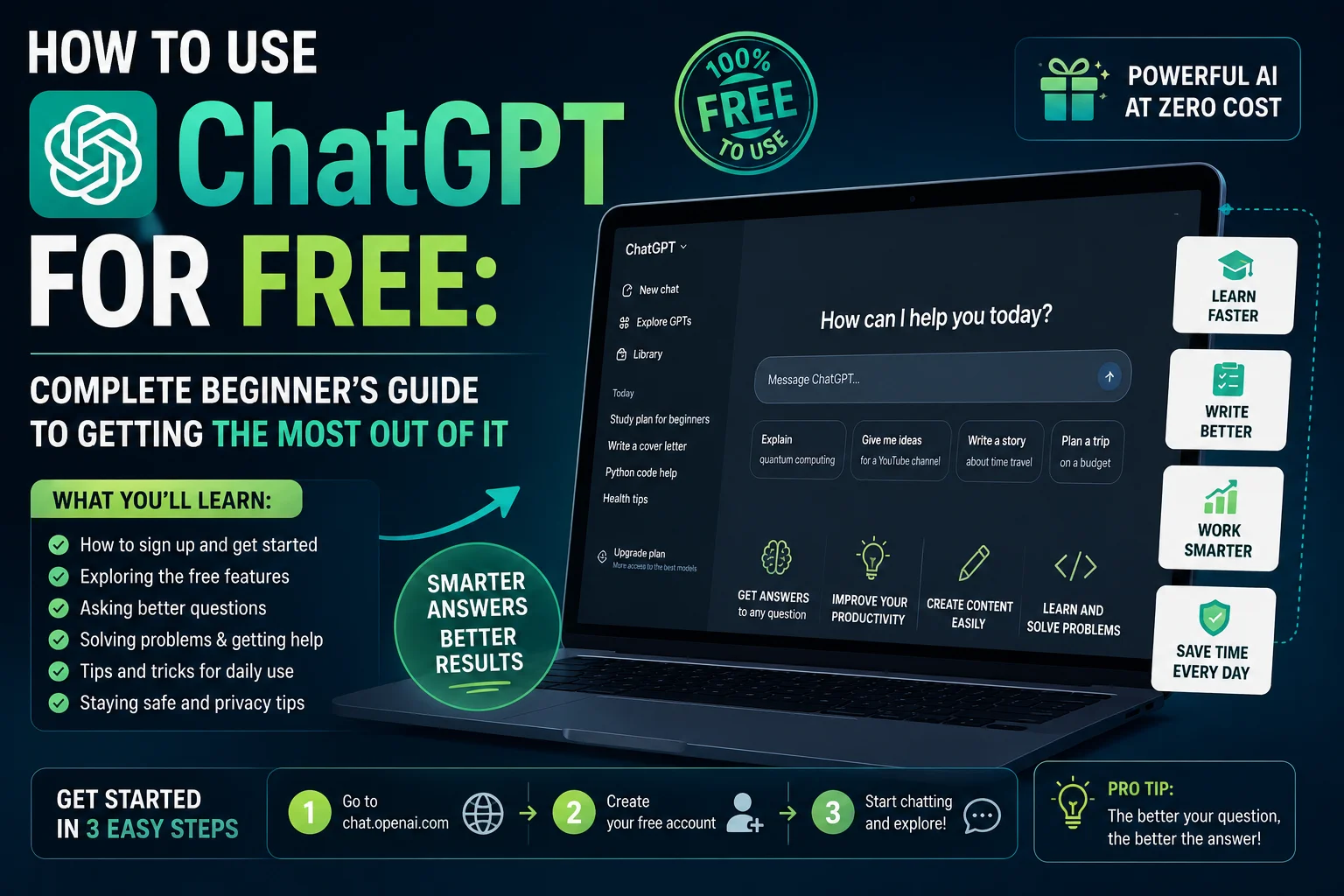
You have heard the name ChatGPT everywhere — in news articles, in conversations at work, in your college group chat, on social media. People talk about it like it has changed the way they work, study, and create. And yet you have never actually opened it and tried it yourself.
Maybe it seemed complicated. Maybe you assumed you had to pay. Maybe you just were not sure where to start.
This guide is written specifically for you. It assumes you know nothing about ChatGPT — and by the time you finish reading, you will know exactly how to create your account, how to start a conversation, how to write prompts that actually get you useful results, what every free feature does, and practical ways to use ChatGPT every single day — all without spending a single rupee.
Let us start from the very beginning.
What is ChatGPT? — A One-Paragraph Explanation
ChatGPT is an AI-powered tool made by a company called OpenAI. You type a question, a request, or a task — and ChatGPT responds in plain, human-like language. It can write emails, answer questions, explain complex topics simply, summarize long documents, help you brainstorm ideas, write code, translate languages, create content, and carry on a real conversation on virtually any topic.
Think of it as a knowledgeable assistant that is available 24 hours a day, never gets tired, never judges your questions, and can help you with an enormous range of tasks — completely free for everyday use.
As of 2026, ChatGPT has over 700 million weekly active users worldwide, making it the most widely used AI tool on the planet. If you have not used it yet, you are in good company — millions of people are discovering it for the first time every week.
Is ChatGPT Really Free? What Do You Get Without Paying?
Yes — ChatGPT is genuinely free to use. You do not need a credit card, a subscription, or any payment to get started.
The free plan in 2026 gives you access to GPT-5.3 Instant — one of the most capable AI models ever built — at absolutely no cost. You get a set number of messages per session, access to the web browsing feature, conversation history, the ability to upload files and images for analysis, and memory features that allow ChatGPT to remember things about you across conversations.
For most beginners and everyday users, the free plan is more than sufficient. You can write emails, get answers to questions, summarize documents, generate ideas, learn new subjects, and handle dozens of practical tasks every day without ever paying anything.
The paid plans — ChatGPT Plus at approximately $20 per month and Pro at a higher price — offer higher message limits, access to the most advanced reasoning models, priority access during peak times, and additional features for power users. But for a beginner getting started, the free plan is a genuinely great experience.
Step One — How to Create Your Free ChatGPT Account
Creating your account takes about three minutes. Here is exactly what to do.
Open your browser — Chrome, Firefox, Safari, or any browser — and go to chatgpt.com. You can also download the ChatGPT app from the Google Play Store on Android or the App Store on iPhone if you prefer to use it on your phone.
On the homepage, click the Sign Up button. You will be given options to sign up using your Google account, your Apple account, your Microsoft account, or with an email address and password. Using your Google account is the fastest option — just click Sign in with Google, choose your Gmail account, and you are done.
If you sign up with email, enter your email address, create a password, and verify your email by clicking the confirmation link that gets sent to your inbox.
After signing in for the first time, ChatGPT will ask for your name and date of birth. Fill these in and you are ready to start.
You will land on the main ChatGPT interface — a clean, simple screen with a message box at the bottom where you type your requests.
Important note: You can technically use ChatGPT without creating an account by visiting chatgpt.com and starting to chat immediately. However, without an account your conversation history is not saved and you lose access to several useful features. Creating a free account takes three minutes and unlocks the full free experience — it is worth doing.
Understanding the ChatGPT Interface — What Everything Does
Before you start using ChatGPT, spend one minute understanding the interface. It is simple, but knowing what each part does makes everything easier.
The message box at the bottom of the screen is where you type your requests. This is your primary point of interaction with ChatGPT. Type anything here and press Enter or click the send button.
The sidebar on the left shows your conversation history. Every conversation you start is saved here with a title automatically generated from the topic. You can click any past conversation to return to it and continue where you left off. You can also rename, share, or delete conversations from here.
The New Chat button at the top of the sidebar starts a fresh conversation. Use this when you want to switch to a completely different topic rather than continuing an existing conversation.
The model selector at the top of the chat window lets you choose which AI model to use. On the free plan you will primarily use the default model. Leave this on the default setting until you are comfortable with the basics.
The attachment icon in the message box lets you upload files, images, PDFs, or documents for ChatGPT to analyze. This is a powerful free feature covered in detail later in this guide.
The memory and settings options under your profile icon allow you to customize how ChatGPT behaves — including setting custom instructions that apply to every conversation automatically.
How to Write Your First Message — The Most Important Skill
The single biggest factor in how useful ChatGPT is for you is how you write your requests. This is called prompting, and it is the skill that separates people who find ChatGPT genuinely transformative from people who try it once, feel underwhelmed, and never return.
The fundamental principle is simple: the more specific and clear your request, the better and more useful the response.
Here is the most common beginner mistake. Someone types “write me an email” and gets a generic template that is not useful for their situation. The fix is simple — provide context, specifics, and any relevant details.
Compare these two requests:
Weak prompt: “Write me an email.” Strong prompt: “Write a polite professional email to my client explaining that their website project will be delayed by one week due to unexpected technical issues. The client’s name is Sharma Ji. Keep the tone apologetic but confident and end with a commitment to deliver by the new deadline.”
The second request gives ChatGPT everything it needs to produce something genuinely useful that you could actually send.
The same principle applies to every type of request. Instead of “explain photosynthesis,” try “explain photosynthesis to me as if I am a 12-year-old who has never studied biology.” Instead of “help me study,” try “create a 10-question quiz on the Indian Independence Movement for a Class 10 student, with answers at the end.”
A useful framework for writing strong prompts is to include four elements when relevant: the task you want done, the context or background information, the format you want the response in, and the audience or tone. You do not need all four every time — but the more relevant context you provide, the better the result.
The Most Useful Things You Can Do With ChatGPT for Free
Here are the most practical, genuinely useful ways to use ChatGPT in everyday life — all available on the free plan.
Writing and Editing
ChatGPT is exceptionally useful for any writing task. Give it context and it will write emails, messages, cover letters, essays, reports, social media captions, product descriptions, blog post drafts, and much more. Even more useful than asking it to write from scratch is using it to improve writing you have already done. Paste in a draft and ask it to “make this more professional,” “simplify the language,” “make it shorter,” “fix any grammatical errors,” or “make the tone more friendly.” It edits instantly and explains any significant changes if you ask.
Getting Answers and Explanations
ChatGPT can explain virtually any concept, on any topic, at any level of complexity you specify. Complex legal terms, medical conditions, financial concepts, historical events, scientific principles, technology topics — ask anything and request the explanation at the level that is right for you. “Explain compound interest as if I am a complete beginner” will give you a different and simpler explanation than “explain compound interest” alone. You can also ask follow-up questions in the same conversation to go deeper on anything you did not fully understand.
Summarizing Long Documents
One of the most practical free features is the ability to paste long text — an article, a contract, a research paper, a news story — and ask ChatGPT to summarize it. “Summarize this in five bullet points” or “give me the key takeaways from this article in simple language” are both effective approaches. You can also ask specific questions about the text — “what does this contract say about cancellation terms?” — and get a direct, clear answer without reading the entire document yourself.
Uploading Files and Images
The free version of ChatGPT allows you to upload files directly from your device — PDFs, Word documents, Excel spreadsheets, images, and more. Upload a PDF and ask questions about it. Upload a photo and ask ChatGPT to describe what it sees, identify objects, or extract text. Upload a spreadsheet and ask it to analyze the data or explain specific numbers. This feature is genuinely powerful and available completely free.
Brainstorming and Idea Generation
ChatGPT is an exceptional brainstorming partner. Need business name ideas? Gift ideas for a specific person? Topics for a blog? Ways to improve a process? Names for a product? Creative approaches to a problem? Describe what you need and ask for a list of ideas. It generates options quickly and without judgment — and you can ask it to refine any idea further with follow-up questions.
Learning New Skills and Subjects
ChatGPT can function as a personal tutor for virtually any subject. Ask it to teach you a concept, then ask follow-up questions, then ask it to quiz you to test your understanding. This conversational approach to learning is far more personalized than a textbook and available around the clock. Students use it to understand difficult topics from their textbooks, prepare for exams, check their understanding, and get explanations in simpler language when their textbook is confusing.
Translation
ChatGPT handles translation between languages remarkably well — including Hindi, Tamil, Bengali, Telugu, Marathi, Gujarati, and other Indian languages, in addition to all major world languages. Paste any text and ask for a translation. You can also ask it to adjust the formality level — “translate this business email from English to Hindi in a formal tone” versus a casual conversational version.
Coding Assistance
Even if you are not a developer, ChatGPT can help you with basic code. Need a simple formula for Excel or Google Sheets? Need a basic Python script to automate something? Want to understand what a piece of code does? ChatGPT explains code in plain language, writes code from descriptions, debugs errors, and teaches programming concepts. For actual developers, it is a powerful productivity tool that can significantly speed up coding work.
Planning and Organization
Use ChatGPT to create plans, schedules, checklists, and frameworks for anything to save time. “Create a 30-day study plan for CA Foundation exams starting from today.” “Give me a weekly meal plan for a vegetarian family of four on a budget of ₹3,000.” “Create a checklist for starting a small e-commerce business in India.” It structures information and creates actionable plans quickly for any goal you describe.
How to Have Better Conversations With ChatGPT — Advanced Tips
Once you are comfortable with the basics, these tips will make your ChatGPT experience significantly more powerful.
Use follow-up messages freely. ChatGPT remembers the entire conversation within a single session. If the first response is not quite right, just reply and say “make it shorter,” “explain that part more simply,” “add more detail about the second point,” or “that is not what I meant — let me clarify.” It adjusts instantly without any frustration. You do not need to start over — just keep the conversation going.
Ask ChatGPT to take on a role. Telling ChatGPT to respond as a specific type of expert often produces much better results. “Act as an experienced financial advisor and explain how I should start investing with ₹5,000 per month” produces a more focused and practically useful response than simply asking for investment advice. Other examples: “Act as a professional editor and review this paragraph for clarity,” or “Act as a patient teacher explaining this topic to a complete beginner.”
Specify the format of the response. If you want a list, ask for a list. If you want a table, ask for a table. If you want a response in exactly 100 words, specify that. If you want the response to avoid technical jargon, say so. ChatGPT follows formatting instructions very well when you give them explicitly.
Use Custom Instructions to personalize every conversation. In your profile settings, go to Custom Instructions. Here you can tell ChatGPT things about yourself that apply to all future conversations — your profession, your language preference, your communication style, your goals. Once set, these apply automatically without you needing to re-explain yourself at the start of every new conversation.
Ask ChatGPT to explain its reasoning. For complex answers or recommendations, follow up with “explain why you recommended this” or “what is the reasoning behind this approach?” This not only helps you understand the answer better but also helps you evaluate whether the response is sound.
Use the regenerate option if you are not satisfied. If ChatGPT gives you a response that is not quite right, you can click the regenerate button to get a different response to the same prompt. Sometimes a slightly different angle produces exactly what you needed.
Things ChatGPT Cannot Do — Know the Limits
Using ChatGPT effectively means understanding what it is not good at.
ChatGPT’s free version has a knowledge cutoff and may not know about very recent events, though the web browsing feature helps with current information when enabled. Always verify important factual claims — especially specific statistics, recent news, or niche facts — through a reliable source before acting on them.
ChatGPT cannot browse specific websites you have not shared with it, access your email or social media accounts, make purchases, or take actions in the real world. It is a conversational tool, not an agent that can do things on your behalf.
ChatGPT sometimes produces incorrect information confidently — a problem called hallucination. It generates statistically plausible text rather than retrieving verified facts, which means it can occasionally be wrong even when it sounds certain. This is why verification matters for anything important.
ChatGPT will not help with requests that violate its usage policies — generating harmful content, assisting with illegal activities, or producing content that could cause real-world harm. These limits are intentional and appropriate.
Practical Examples — Real Prompts You Can Use Today
Here are ten ready-to-use prompts for common everyday situations. Copy and adapt them for your own needs.
For a professional email: “Write a polite email to my manager requesting two days of work-from-home next week due to a family health situation. Keep the tone professional and respectful.”
For studying: “Explain the causes of World War One to me as if I am a Class 10 student studying for board exams. Use simple language and list the three most important causes clearly.”
For a cover letter: “Write a cover letter for a marketing executive position at a digital agency. I have three years of experience in social media marketing and have managed campaigns for FMCG brands. Keep it to three paragraphs.”
For summarizing: “Here is a long article. Please summarize it in five bullet points covering the most important information.” Then paste the article text.
For learning a skill: “I want to learn basic Python programming from scratch. I am a complete beginner with no coding experience. Create a simple lesson plan for my first week of learning, with specific topics for each day.”
For creative writing: “Write the opening paragraph of a short story set in Mumbai during the monsoon season. The main character is a 30-year-old woman who has just received unexpected news. The tone should be reflective and slightly melancholic.”
For health information: “Explain what Type 2 diabetes is, what causes it, and what the main lifestyle changes are that help manage it. Explain in simple language suitable for someone who has just been diagnosed.”
For business ideas: “I have ₹50,000 to invest and I am based in a tier-2 Indian city. Generate ten low-investment business ideas that can be started part-time while keeping a regular job. Focus on ideas with digital components.”
For travel planning: “Create a 3-day travel itinerary for Jaipur, Rajasthan. I am traveling with my family including two children aged 8 and 12. Include a mix of historical sites and activities suitable for kids, with practical timing and travel suggestions.”
For language practice: “I want to practice conversational English. Start a casual conversation with me in English about weekend plans. Correct any grammatical mistakes I make gently and explain the correction.”
ChatGPT vs Google — When to Use Which
A common question from beginners is whether ChatGPT replaces Google. The answer is no — they serve different purposes and work best used together.
Use Google when you need current news and real-time information, when you need to find a specific website or official resource, when you want to compare prices or check availability, or when you need to find reviews or local business information.
Use ChatGPT when you want something written or created, when you need a concept explained in simple terms, when you want to analyze, summarize, or transform existing text, when you need help brainstorming or planning, or when you want to have a back-and-forth conversation to work through a problem or idea.
The most effective approach in 2026 is to use both together. Use Google to find sources and current information, then use ChatGPT to help you understand, summarize, or work with that information.
Key Takeaway
ChatGPT is one of the most genuinely useful tools available to anyone with an internet connection in 2026 — and the free version is powerful enough for the vast majority of everyday tasks. Creating an account takes three minutes. The interface is simple and clean. The only learning curve is getting better at writing prompts — and that skill improves naturally with practice.
The best way to learn ChatGPT is to simply start using it. Open chatgpt.com today, create your free account, and try asking it something you genuinely want to know or something you genuinely need help with. The first useful response you get will show you immediately why hundreds of millions of people have made it a regular part of their daily lives.
Frequently Asked Questions
Is ChatGPT free to use in India?
Yes — ChatGPT is completely free to use in India. Go to chatgpt.com, create a free account using your Google account or email, and start using it immediately. No payment, credit card, or subscription is required to access the free plan.
What is the difference between ChatGPT free and paid?
The free plan gives you access to a capable AI model with a set number of messages per session, web browsing, file upload, and conversation history. The paid Plus plan at approximately $20 per month offers significantly higher message limits, access to the most advanced reasoning models, and priority access during busy periods. For most beginners and everyday users, the free plan is more than sufficient.
Can ChatGPT make mistakes?
Yes — ChatGPT can and does make mistakes, particularly on very specific facts, recent events, and niche topics. It generates statistically plausible responses rather than retrieving verified facts, which means it can occasionally be confidently wrong. Always verify important information through a reliable source before using it for significant decisions.
Does ChatGPT remember our previous conversations?
Within a single conversation session, ChatGPT remembers everything discussed in that session. The memory feature on the free plan can also remember specific facts about you across different conversations if you enable it. However, each new conversation starts fresh unless you have memory enabled or you bring in relevant context from previous conversations yourself.
Is it safe to share personal information with ChatGPT?
Avoid sharing sensitive personal information such as your Aadhaar number, bank account details, passwords, or medical records with ChatGPT. While OpenAI has privacy measures in place, conversations may be reviewed for safety and quality purposes. Treat ChatGPT like a public tool — share what you need for the task but keep genuinely sensitive personal data private.
Can I use ChatGPT on my phone?
Yes — ChatGPT has official free apps for both Android (Google Play Store) and iPhone (App Store). The mobile app is well-designed, includes all the same features as the web version, and also offers a voice conversation mode where you can speak to ChatGPT and hear its responses spoken back to you.
Final Thoughts
ChatGPT is not complicated. It is not only for tech experts. It does not require payment. And it does not require any special knowledge to start getting genuine value from it.
It is a tool — a very powerful one — that is accessible to anyone willing to spend three minutes creating an account and a few more minutes learning how to write clear, specific requests.
The people who get the most out of ChatGPT are not necessarily the most technical. They are the ones who approach it with genuine curiosity, experiment with different ways of asking for things, and gradually develop a sense of what it can and cannot do well.
You now have everything you need to start. Go to chatgpt.com, create your free account, and try your first prompt. Everything after that is practice — and practice with ChatGPT is genuinely enjoyable.