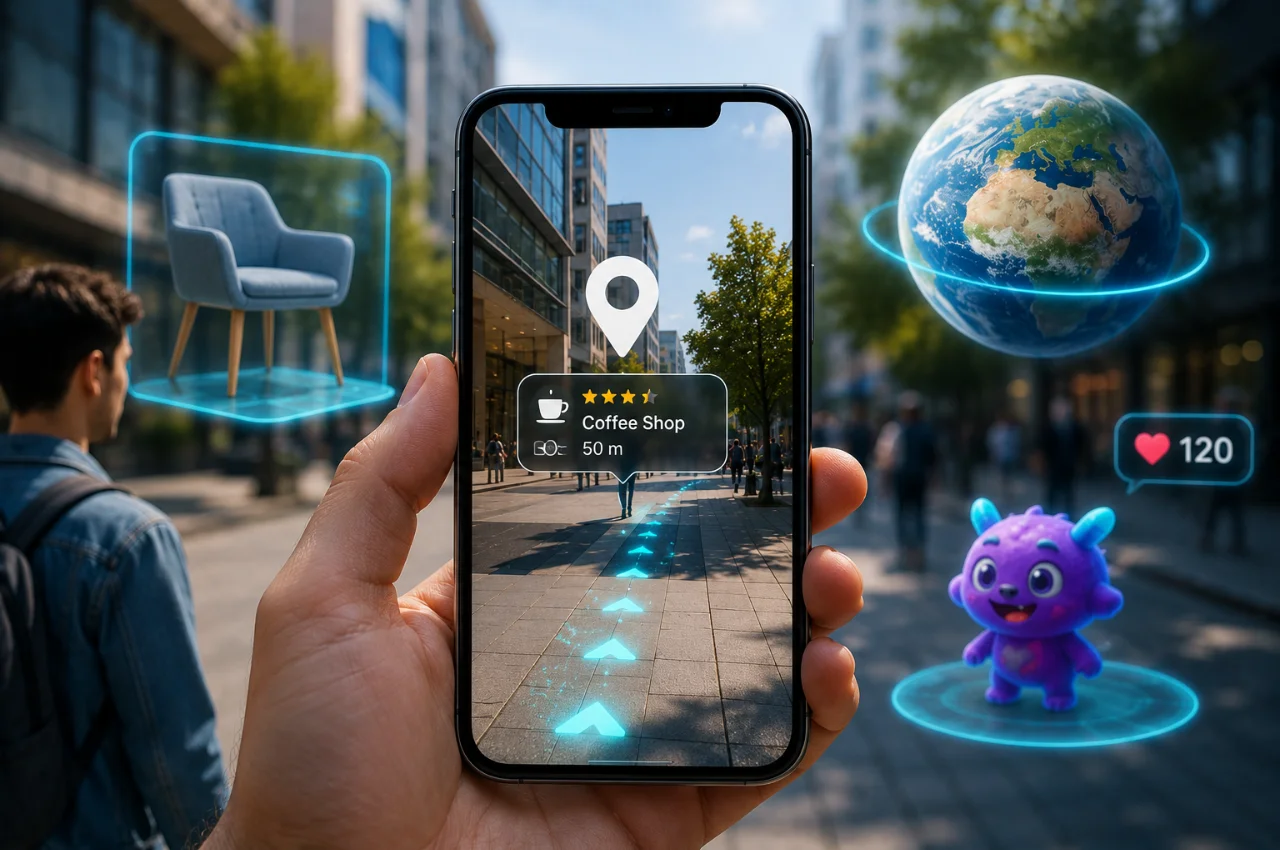
Open Snapchat and apply a dog filter — your face gets ears and a tongue in real time. Open Google Maps and point your camera at a street — arrows appear on your screen showing exactly which way to walk. Try on sunglasses on an e-commerce website without physically picking them up. Scan a textbook page with an app and watch a 3D model of the human heart rotate on your screen.
All of these experiences — as different as they seem — are powered by the same technology: Augmented Reality.
Most people have used augmented reality dozens or hundreds of times without realizing it had a name, or that the technology behind it is one of the most significant developments in computing in the past decade. This guide explains exactly what AR is, how it works, where you are already using it every day, and where it is headed next — in plain, simple language.
What is Augmented Reality?
Augmented Reality, commonly abbreviated as AR, is technology that overlays digital information — images, text, sounds, animations, or 3D objects — onto your view of the real physical world in real time.
The word augmented means enhanced or added to. AR does not replace the real world with something digital — it adds digital elements on top of the real world. You can still see your actual surroundings. The digital content appears as a layer on top of reality, blending with what you see through your phone’s camera or through special glasses.
This is the most important distinction between AR and Virtual Reality. Virtual Reality creates a completely artificial environment that replaces the real world — you put on a headset and are transported to a digital space entirely. Augmented Reality keeps you in the real world and simply adds digital elements to it. You see your actual room, your actual street, your actual face — and AR places additional information, objects, or effects on top of that real view.
Think of it like a transparent piece of glass with digital information printed on it, held up between you and the world. Through the glass, you can see everything in the real world exactly as it is — but you also see the digital information overlaid on top of it. That is the fundamental concept behind every AR experience.
A Brief History — Where AR Came From
Augmented Reality did not appear suddenly with smartphones. Its roots go back much further than most people realize.
The earliest concept of displaying digital information over a person’s view of reality appeared in a science fiction novel in 1901, when author L. Frank Baum described electronic spectacles that could overlay information about people onto the viewer’s vision.
The first actual AR system was built in 1968 by Ivan Sutherland at Harvard University. He created a head-mounted display that could render simple 3D wireframe graphics and overlay them onto the viewer’s real-world vision. The device was so heavy it had to be attached to the ceiling, earning it the nickname “The Sword of Damocles.”
The term “Augmented Reality” was coined in 1990 by Thomas Caudell, an engineer at Boeing who used the technology to help factory workers visualize complex aircraft wiring layouts overlaid onto actual physical components — one of the first practical industrial uses of the technology.
The consumer revolution in AR came in 2016 with the launch of Pokemon Go — the game that sent hundreds of millions of people outside holding up their phones to catch virtual creatures overlaid on real streets, parks, and buildings. For many people, this was their first conscious experience of augmented reality, and it demonstrated more powerfully than any technical demonstration could that the technology was ready for mass consumer use.
Since then, AR has spread into virtually every category of consumer and professional application, powered by the cameras, processors, and sensors already built into modern smartphones.
How Does Augmented Reality Actually Work?
AR sounds like magic, but the process behind every AR experience follows a logical sequence of steps that your device performs in milliseconds.
The first step is environment capture. Your phone’s camera continuously captures video of your real-world surroundings — every second, dozens of frames of your environment are being processed. This raw visual data is the foundation that everything else builds on.
The second step is environment understanding. The AR system analyzes the captured video using computer vision — software that can identify and interpret what the camera sees. The system recognizes surfaces such as floors, walls, and tables. It identifies objects and their locations in three-dimensional space. It understands depth — how far away different elements of the scene are. And it tracks features in the environment that can serve as anchors for digital content.
The third step is digital content generation. Based on what the AR system has understood about the environment, it generates the appropriate digital content to display. This might be a 3D model of a sofa rendered to fit the scale of your room, an animated filter sized and positioned to match your face, directional arrows placed on the street you are looking at, or text information displayed above a product you are scanning.
The fourth step is tracking and alignment. As you move your phone or your head, the AR system continuously updates the position and orientation of the digital content to keep it correctly aligned with the real world. This is what makes AR feel convincing rather than like a simple image pasted onto video — the digital objects maintain their position relative to the real world as your viewpoint changes. A 3D sofa placed in your living room stays in place as you walk around it, because the AR system is continuously calculating where it should appear based on your changing position.
The fifth step is display. The final combined image — your real camera view with the digital elements correctly positioned and rendered within it — is displayed on your screen in real time. This happens fast enough that the experience feels immediate and responsive rather than delayed.
Your smartphone can perform all of these steps because it already contains everything AR requires — a high-quality camera, a powerful processor, accelerometers and gyroscopes that detect movement and orientation, a GPS chip, and software frameworks like Apple’s ARKit and Google’s ARCore that handle the complex computer vision and tracking work automatically.
The Four Types of Augmented Reality
Not all AR experiences work the same way. There are four main types of augmented reality, each using a different method to anchor digital content to the real world.
Marker-based AR uses a specific image, pattern, or QR code as a trigger. When your phone’s camera detects the marker, the AR content appears anchored to it. Scanning a QR code on a product package and seeing a 3D animation appear is marker-based AR. The marker acts as a precise reference point that tells the AR system exactly where and how to position the digital content.
Markerless AR does not require a specific trigger image. Instead, it uses your phone’s sensors — accelerometer, gyroscope, GPS, and compass — to understand where the device is in space and place digital content at a position in the real world independent of any specific physical object. The ability to place a 3D model of furniture anywhere on your floor is markerless AR — the system detects the flat surface and places the object there without needing any special marker.
Location-based AR uses GPS and compass data to trigger and position AR content based on your geographic location in the real world. Pokemon Go is the most famous example — virtual creatures appear at specific geographic coordinates, so they appear in your real environment when you are physically at the right location. Google Maps Live View, which overlays walking directions on your camera view, is also location-based AR.
Projection-based AR projects digital light or images directly onto real-world physical surfaces rather than displaying them on a screen. This is the type seen in stage performances where visuals are projected onto objects, in interactive table surfaces in some retail and museum installations, and in experimental products like smart projectors that can turn any surface into an interactive display.
Where You Already Use Augmented Reality Every Day
This is the section that surprises most people — because AR is already present in tools and apps they use regularly, often without realizing the technology has a name.
Snapchat and Instagram filters are augmented reality. Every filter that adds dog ears to your face, changes your hair color, places virtual makeup on your skin, puts a crown on your head, or transforms your expression is a real-time face-tracking AR system. The app uses your phone’s camera to detect your face, maps dozens of facial landmarks in three dimensions, and then overlays digital content that correctly tracks and moves with your face as you turn your head or change your expression. This is genuine, sophisticated AR that hundreds of millions of people use every day.
Google Maps Live View navigation is AR. When you activate Live View walking directions in Google Maps and point your camera at a street, large directional arrows and distance markers appear overlaid on your real camera view, showing you exactly which direction to walk and how far your destination is. This combines GPS for location, computer vision for understanding the street environment, and digital overlay to display the navigation information — all the core components of AR.
Virtual try-on features in shopping apps and websites are AR. Amazon, Myntra, Lenskart, and many other major retailers now allow you to point your phone’s camera at yourself or your room and see how a product would look in reality before buying. Glasses that appear on your face when you point the camera at yourself. Shoes that appear on your feet. Sofas that appear in your living room. Lipstick colors that appear on your lips. All of these use AR to render virtual products into your real camera view with accurate scale, positioning, and in many cases, real-time lighting adjustment.
Google Lens and similar visual search tools use AR principles. Point your phone’s camera at a plant and instantly see what species it is. Point it at text in a foreign language and see the translation overlaid in real time. Point it at a product in a store and instantly see pricing and reviews. Point it at a math equation and see the solution. These tools use computer vision to understand what the camera sees and overlay relevant information — a practical form of informational AR that is increasingly built into default camera apps.
IKEA Place and similar furniture apps are AR. Rather than buying a sofa and hoping it fits your living room, you can use IKEA’s app to place a photorealistic, correctly scaled 3D model of any product in your actual room through your phone’s camera. Walk around it, see how the color works with your walls, check whether it fits the space. This is one of the most practically useful consumer AR applications, and it works entirely through the camera in your existing smartphone.
Educational apps use AR to make learning tangible. Several apps allow students to point their phones at textbook diagrams and see them transform into interactive 3D models. A diagram of the solar system becomes a navigable 3D space. A drawing of a human skeleton becomes a rotating, interactive 3D model. A geography lesson about mountain formation becomes a visual animation playing out on the page. AR makes abstract concepts physically present and interactive in a way that static images and text cannot.
Sports broadcast graphics use AR. The yellow first-down line you see overlaid on an American football field during broadcasts, the speed and trajectory data overlaid on cricket ball tracking replays, the swimming lane comparison lines in Olympic broadcasts — these are all forms of augmented reality applied to live video to provide additional information to viewers. This form of AR has been used in professional broadcasting for decades, making it one of the oldest consumer-facing applications of the technology.
Automotive heads-up displays are AR. Many modern cars project navigation instructions, speed, and safety alerts onto the windshield directly in the driver’s line of sight — eliminating the need to look down at instruments or a screen. The driver sees the road ahead with digital information overlaid on it, exactly as they would through an AR display. This head-up display technology is one of the most safety-improving applications of AR, keeping the driver’s attention on the road while providing essential information.
AR in Professional and Industrial Settings
Beyond consumer applications, AR is transforming how professionals work across multiple industries — often with more dramatic impact than the consumer applications that get more media attention.
In healthcare and medicine, surgeons use AR displays that overlay patient scan data — CT scans, MRI data — directly onto their field of view during surgery, allowing them to see beneath the surface of the patient in real time without looking away from the operating field. Medical students use AR applications to study anatomy by exploring interactive 3D models of the human body in far more detail than flat textbook diagrams allow. Training for complex procedures can be conducted in AR environments that simulate real conditions without requiring actual patients.
In manufacturing and engineering, AR is used to guide factory workers through complex assembly processes. Rather than consulting a manual, workers see step-by-step instructions and component annotations overlaid directly on the actual machine or component they are working on. This reduces assembly errors, speeds up training time for new employees, and allows complex technical documentation to be accessed hands-free during actual work. Companies like Boeing, Volkswagen, and DHL have deployed industrial AR extensively in their operations.
In architecture and construction, AR allows architects and clients to walk through full-scale virtual buildings before a single foundation stone is laid. Point a phone or tablet at an empty plot of land and see the proposed building rendered at full scale in that actual location. Check how the structure will relate to surrounding buildings. Walk through virtual floor plans placed in the actual space. This dramatically improves design communication between architects, clients, and contractors.
In retail, AR is transforming how customers evaluate products before purchasing. Virtual fitting rooms allow clothing retailers to let customers try garments without physically changing. Cosmetics retailers let customers test makeup colors on their actual face. Furniture retailers like IKEA have moved beyond their app to in-store AR experiences. Automotive showrooms use AR to let customers customize and visualize vehicles with different colors, wheels, and features in real time.
In education, AR is creating learning experiences that were previously impossible. History students can see reconstructions of ancient monuments overlaid on their actual ruins. Science students can conduct virtual laboratory experiments overlaid on their actual laboratory bench. Geography students can explore geological formations in 3D. Language students can see translations overlaid on real-world text in real time. AR makes learning experiential rather than purely abstract.
AR vs VR vs MR — Understanding the Differences
These three terms are often used interchangeably in media coverage, but they describe genuinely different technologies.
Augmented Reality adds digital content on top of the real world. You remain in your real environment and see digital elements layered over it. Your phone camera, Instagram filters, and Google Maps Live View are AR. The real world is always present and visible.
Virtual Reality replaces the real world with a completely digital environment. You wear a headset that blocks out the physical world entirely and immerses you in a simulated 3D space. You can look in every direction and see only the virtual environment. Gaming, virtual tours, and immersive training simulations use VR. The real world disappears.
Mixed Reality is a more advanced blend of both. Like AR, you can see the real world — but like VR, digital objects can interact with the real environment in more sophisticated ways. A mixed reality experience might allow you to place a virtual ball on a real table and have it roll off the edge and fall to the floor, reacting to the real physical surface. Microsoft HoloLens and Apple Vision Pro are mixed reality devices. The digital and real genuinely interact rather than simply coexisting.
Extended Reality is the umbrella term that encompasses all of these technologies — AR, VR, MR — and any future technology that blends digital and physical reality in any way.
The Devices Used for Augmented Reality
AR experiences are delivered through several different types of devices, each with different capabilities and trade-offs.
Smartphones are the most common AR device — because everyone already has one. Your phone’s camera, processor, and sensors contain everything needed to run sophisticated AR applications. Almost all consumer AR experiences in 2026 are delivered through smartphone apps, making AR accessible to the over five billion smartphone users worldwide without any additional hardware purchase.
Tablets offer the same capability as smartphones with the advantage of a larger screen, which makes AR experiences more immersive and easier to use for applications like furniture placement, educational content, and design work.
AR glasses and headsets are dedicated devices that display AR content through lenses you wear rather than through a screen you hold. They have the significant advantage of being hands-free — you can interact with the real world normally while seeing AR content. However, they are currently expensive, have limited battery life, and face social acceptance challenges. Examples include Microsoft HoloLens for industrial use, Apple Vision Pro for consumer and professional use, and various smart glasses from Meta, Snap, and other companies. This category is evolving rapidly and is expected to become the primary AR interface over the next decade as devices become smaller, lighter, and more affordable.
Heads-up displays are integrated into vehicles and some industrial equipment, projecting information into the user’s field of view without requiring them to look at a separate screen.
The Future of Augmented Reality
AR in 2026 is genuinely useful and widely deployed — but it is still early in the technology’s development. The direction it is heading suggests experiences that are dramatically more seamless, more powerful, and more integrated into daily life.
AR glasses are expected to become the dominant AR interface over the next five to ten years, as hardware miniaturization, battery technology, and display optics continue to improve. The vision is wearable AR that is light enough to wear all day and socially acceptable in public — displaying relevant information in your field of view throughout your daily life without requiring you to pull out a phone. Directions overlaid on the street as you walk. The name of the person approaching you shown above their head. Real-time translation of foreign text. Notifications displayed in the corner of your vision.
AI integration is making AR dramatically more capable. When AR systems can not only see the environment but genuinely understand it — recognizing specific objects, people, and situations — the experiences they can deliver become far more relevant and useful. Rather than generic information, AI-powered AR can provide context-aware information specific to exactly what you are looking at.
Spatial computing — of which AR is a core component — is increasingly seen as the computing paradigm that follows smartphones. Just as smartphones moved computing from desktops to your pocket, spatial computing moves computing from your pocket to your environment. The world itself becomes an interface, with digital information existing naturally in physical space rather than trapped behind glass screens.
Key Takeaway
Augmented Reality is not a future technology. It is a present technology that you have almost certainly already used — in Instagram filters, Google Maps navigation, online shopping try-ons, and educational apps. It works by overlaying digital content on your real-world camera view in real time, using your phone’s camera, processor, and sensors to understand the environment and correctly position digital elements within it.
The distinction that matters most is the difference between AR and VR — AR keeps you in the real world and adds to it, while VR replaces the real world entirely. This makes AR more practical for everyday use because it does not require isolation from your environment.
We are at the beginning of what AR will eventually become. The smartphone experiences of today — impressive as they are — are the earliest chapter of a technology that will eventually reshape how information is accessed, how work is performed, how learning happens, and how the physical and digital worlds relate to each other.
Frequently Asked Questions
Is augmented reality the same as virtual reality?
No — they are related but fundamentally different. AR overlays digital content on your real-world view — you can still see your actual surroundings. VR replaces your real-world view with a completely artificial environment — you see only the digital simulation. AR keeps you grounded in reality and adds to it. VR removes you from reality entirely.
Do I need special glasses to experience AR?
No — the vast majority of AR experiences in 2026 are delivered through your existing smartphone. Instagram filters, Google Maps navigation, virtual try-ons, and Google Lens all run on standard smartphones. Dedicated AR glasses provide a hands-free experience and are better for certain professional applications, but they are not required for most everyday AR experiences.
Is Pokemon Go augmented reality?
Yes — Pokemon Go was one of the first mainstream consumer applications of AR. It uses your phone’s GPS, camera, and compass to place virtual Pokemon creatures at real-world geographic locations, making them appear in your real environment when you point your camera at the right place. However, many players turn off the AR feature because it drains battery quickly, playing in the simpler non-AR mode instead.
How is Google Maps Live View different from regular navigation?
Regular Google Maps navigation shows a map interface with a blue dot indicating your position. Google Maps Live View activates your camera and overlays large directional arrows and street names on your actual camera view of the real world, making it immediately clear which direction to walk. It is particularly useful in unfamiliar areas where the map interface can be disorienting.
Is AR safe? Are there any concerns about privacy?
AR does raise legitimate privacy concerns, particularly as it becomes more capable. AR applications that use your camera have access to your physical environment and everything in it. More advanced AR, especially when combined with AI that can recognize people and objects, raises concerns about surveillance and consent. Most current consumer AR applications are straightforward and the privacy implications are similar to other camera-enabled apps — review permissions carefully for any AR app you install, just as you would for any application requesting camera access.
Will AR glasses replace smartphones?
This is widely debated in the technology industry. The most likely trajectory is that AR glasses will become a companion to smartphones rather than an immediate replacement — handling certain tasks better through the glasses interface while smartphones remain primary for other tasks. A full replacement of the smartphone by AR glasses would require glasses to become significantly smaller, lighter, more powerful, and more socially accepted than current devices. This transition is expected to happen gradually over the next decade rather than suddenly.
Final Thoughts
Augmented Reality is one of those technologies that seems futuristic until you realize you have been using it for years. Every time you apply a Snapchat filter, follow walking directions in Google Maps by pointing your camera at the street, or use an app to see how furniture will look in your room — you are using augmented reality.
The technology works because modern smartphones already contain everything needed to run sophisticated AR experiences — cameras that capture the environment, processors that understand it, and screens that display digital content seamlessly over it. No special hardware, no expensive headsets, no technical knowledge required.
Understanding AR means understanding one of the most significant directions in which computing is moving. The smartphone brought computing into your pocket. Augmented reality is beginning to bring computing into your environment — making the world itself an interface for digital information. That shift is already underway, in the apps on your phone today, and it will only become more integrated into daily life in the years ahead.