You’re browsing phones on Flipkart or Amazon and you see a listing that says “8GB RAM + 128GB ROM.” You know these numbers matter. You know more is somehow better. But do you actually know what RAM and ROM are, and why they affect your phone the way they do?
Most people don’t — and that’s perfectly fine. These are technical terms that phone manufacturers throw at buyers without ever properly explaining them. This guide fixes that completely. By the end, you will understand exactly what RAM and ROM are, what they do inside your phone, how they affect your daily experience, and how much of each you actually need in 2026.
No technical background required. Just plain, simple language with real examples you can relate to.
The Simple One-Line Answer First
Before we go into detail, here are the simplest possible explanations:
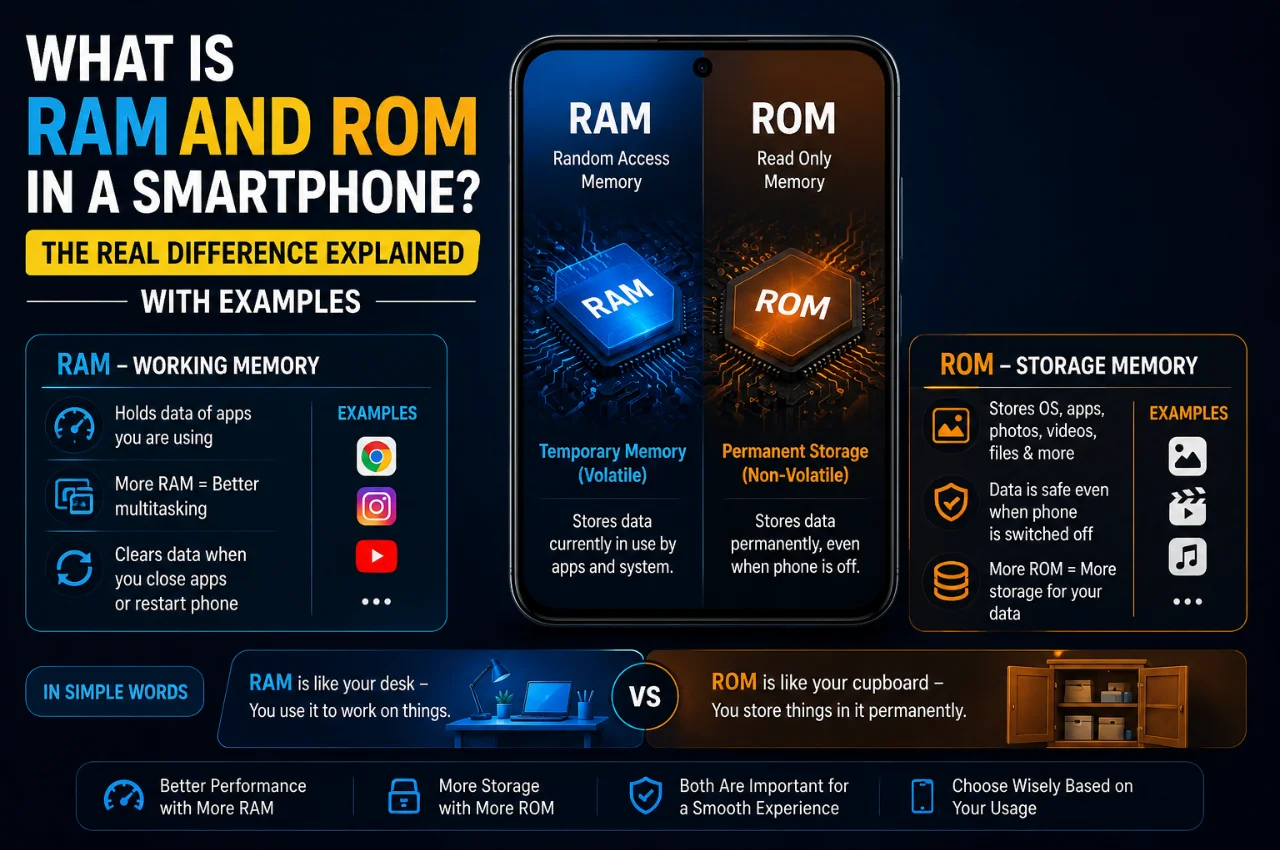
RAM is your phone’s working memory — it handles everything your phone is currently doing right now.
ROM is your phone’s storage memory — it holds everything saved on your phone permanently, including your photos, apps, and videos.
That’s the core difference. Now let’s understand each one deeply with real examples.
What is RAM? — Your Phone’s Desk Space
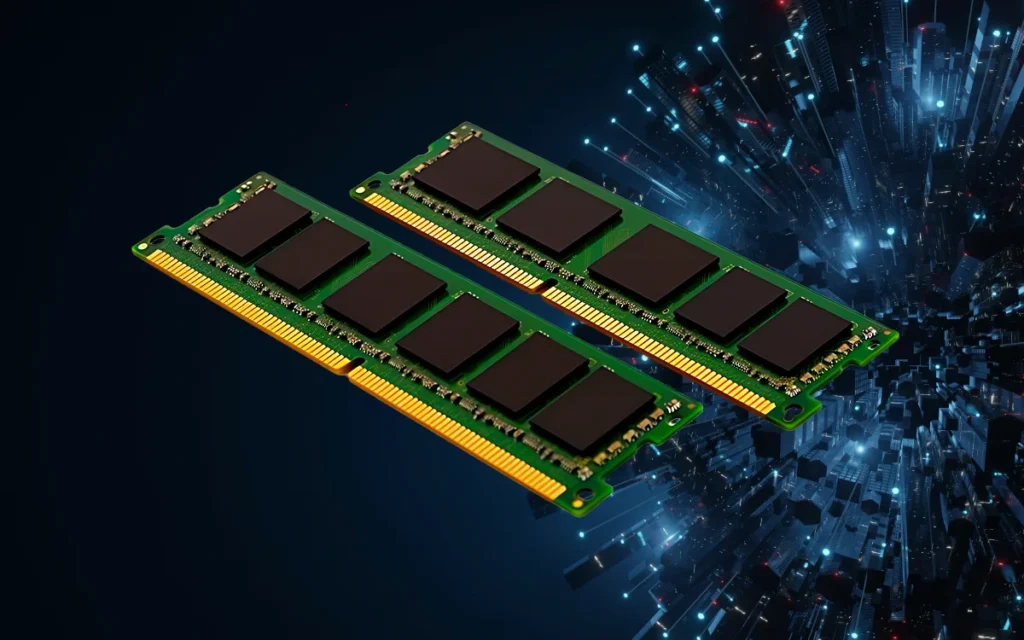
RAM stands for Random Access Memory. In a smartphone, RAM is the temporary memory that your phone uses to run apps, process tasks, and handle everything that is happening on screen at this exact moment.
The best way to understand RAM is through a simple analogy. Imagine your phone is a student sitting at a desk and doing homework. The desk itself — the surface where the student lays out books, notebooks, and papers to work on — is the RAM. Everything currently being used is spread out on this desk for instant access.
When you open Instagram, that app gets loaded onto the desk. When you also open WhatsApp, YouTube, and Google Maps at the same time, all of those apps are sitting on the desk too. The bigger the desk — the more RAM — the more apps can stay open simultaneously without things getting crowded and slow.
When you close an app or restart your phone, everything on the desk gets cleared away. Nothing on the RAM is saved permanently. It is purely a temporary workspace that exists only while the phone is running.
This is why RAM is called volatile memory — it loses everything when the power is cut.
Real-world RAM example:
You are watching a YouTube video. You get a WhatsApp message and switch to reply. Then you open Google Maps to check a route. Then you go back to YouTube and the video continues exactly where you left off, instantly — no reloading.
This seamless experience is RAM at work. All three apps stayed loaded in RAM simultaneously. If your phone had very little RAM, YouTube would have reloaded from scratch when you returned to it — because the phone had to remove it from RAM to make space for the other apps.
What does RAM affect in daily use?
RAM directly affects how smoothly your phone handles multitasking. With more RAM, more apps stay open simultaneously without reloading. App switching is faster and smoother. Games run more consistently without stuttering or frame drops. The phone feels responsive even when many things are running at once.
With insufficient RAM, apps reload every time you switch back to them. The phone feels laggy when jumping between apps. Games may stutter or crash. The overall experience feels slow and frustrating even if the processor is fast.
What is ROM? — Your Phone’s Cupboard
ROM stands for Read-Only Memory. In modern smartphones, ROM is used as a general term for your phone’s internal storage — the permanent space where everything on your phone lives even when it is switched off.
Going back to the student analogy — if RAM is the desk, ROM is the cupboard or bookshelf in the room. All your textbooks, files, notebooks, and belongings are stored in the cupboard. You take things out of the cupboard and put them on your desk when you need them. When you are done, you put them back in the cupboard for safekeeping.
Your photos, videos, downloaded music, installed apps, documents, and the Android operating system itself — all of this is stored in ROM. None of it disappears when you turn off your phone. It is all still there when you turn it back on, because ROM is non-volatile memory — it retains data without power.
Real-world ROM example:
You take 50 photos at a wedding. You download 10 apps. You save 5 movies for offline viewing. All of this data goes into your ROM. When you turn off your phone and turn it back on the next morning, every single photo, app, and movie is still there — because it was saved permanently in ROM.
Now imagine your ROM is almost full — you get that dreaded “Storage Almost Full” notification. This means your cupboard is overflowing. You cannot save new photos or install new apps because there is no more space. This is a ROM problem, not a RAM problem.
What does ROM affect in daily use?
ROM determines how much content you can store on your phone. With more ROM, you can install more apps, save more photos and videos, download more music and movies, and keep your phone running smoothly for longer without constantly deleting things. With insufficient ROM, you get storage-full warnings, cannot install updates, and constantly have to choose which apps to delete to make room for new ones.
An Important Truth About ROM in Smartphones
Here is something most buyers do not know: technically speaking, ROM in its purest definition means “Read-Only Memory” — memory that can only be read, not written to. Classic examples of pure ROM include the BIOS chip in computers and the bootloader chip in phones — tiny amounts of firmware that only store instructions for starting up the device.
When phone manufacturers list “128GB ROM” in their specifications, they are not technically referring to actual Read-Only Memory. They are referring to the phone’s internal flash storage — the NAND flash memory that stores your apps, photos, and operating system. This storage can be both read and written freely.
The use of “ROM” to mean “internal storage” is a marketing simplification — a shortcut that became industry-wide convention, particularly in Asian markets. The actual true ROM inside your phone is just a few megabytes of bootloader chips — nowhere near 128GB.
So when you see “128GB ROM” on a spec sheet, translate it in your mind as: “128GB internal storage.” That is what it means in practical terms.
RAM vs ROM — The Complete Comparison
Full Form: RAM is Random Access Memory. ROM is Read-Only Memory (used as internal storage in practice).
Purpose: RAM runs apps currently in use. ROM stores everything permanently.
Data Persistence: RAM loses all data when the phone is switched off. ROM retains all data permanently.
Speed: RAM is extremely fast — designed for instant access. ROM is slower than RAM but faster than external storage.
Typical Sizes in 2026: RAM ranges from 4GB to 16GB. ROM ranges from 64GB to 512GB.
What it affects: RAM affects multitasking speed and app switching. ROM affects how much you can store on your phone.
Analogy: RAM is the desk. ROM is the cupboard.
Can you add more? RAM cannot be expanded after purchase. ROM can sometimes be expanded via microSD card on compatible phones.
How RAM and ROM Work Together — The Complete Picture
RAM and ROM do not work independently — they work as a team, and understanding their relationship makes everything clearer.
Here is the complete picture of what happens when you open an app:
Step one — you tap the app icon. Android looks for the app’s data in ROM (internal storage). Step two — the app’s data is loaded from ROM into RAM (moved from the cupboard to the desk). Step three — the processor (CPU) uses the data in RAM to run the app and display it on screen. Step four — when you close the app, Android may keep it in RAM for a while (so it reopens quickly) or clear it to make space for other apps. Step five — any new data you create — a new photo, a saved file — is written back to ROM for permanent storage.
This constant movement of data between ROM and RAM is what your phone is doing every second of every day. RAM handles the speed of the process. ROM handles the storage of the results.
How Much RAM Do You Actually Need in 2026?
This is the question most buyers really want answered, and the answer has shifted significantly in recent years as Android has become more efficient.
4GB RAM is insufficient in 2026. Budget phones with 4GB RAM feel noticeably slow, apps reload constantly, and multitasking is frustrating. Avoid this if possible.
6GB RAM is the minimum acceptable level for basic use in 2026. Social media, WhatsApp, calls, and light browsing work adequately. Heavy multitasking will still cause app reloads.
8GB RAM is the sweet spot for most users in 2026. This handles everyday tasks, most games, and comfortable multitasking without frequent app reloads. If you use your phone for social media, YouTube, WhatsApp, UPI payments, and casual gaming — 8GB is genuinely sufficient.
12GB RAM suits power users who keep many apps open, play demanding games like BGMI or Call of Duty Mobile, or use their phone for productivity work with multiple heavy apps running simultaneously.
16GB RAM and above is present in flagship phones and is overkill for almost all everyday users. The marginal benefit beyond 12GB is minimal for typical use cases.
One important note: iPhone users should not directly compare RAM numbers with Android. Apple iPhones with 6GB or 8GB RAM consistently outperform Android phones with 12GB RAM in smoothness and app retention, because iOS manages memory far more efficiently than Android. The number means different things on different operating systems.
How Much ROM (Internal Storage) Do You Actually Need in 2026?
64GB is too little for most users in 2026. The operating system, pre-installed apps, and system files consume 15GB to 25GB before you install anything. This leaves very little space for photos, apps, and videos.
128GB is the minimum you should buy in 2026 for comfortable daily use. This handles a reasonable number of apps, a decent photo collection, and some downloaded content without constant storage management headaches.
256GB is the ideal storage choice for most users, especially if you take lots of photos and videos, download music or movies for offline use, or install many apps and games. This amount provides comfortable headroom for several years of use.
512GB and above is for professional content creators, videographers, or power users who store large amounts of media directly on their phone.
Virtual RAM — The Feature You Have Probably Seen on Your Phone
You may have noticed a setting on some Android phones — particularly Realme, Xiaomi, OPPO, and Samsung mid-range models — called Virtual RAM, RAM Extension, or Memory Expansion. It claims to add 4GB, 6GB, or even 8GB of extra RAM.
Here is what this feature actually does and whether it works: Virtual RAM borrows space from your ROM (internal storage) and uses it as an extension of your actual RAM. So a phone with 6GB of real RAM and 4GB Virtual RAM set to on will behave somewhat like an 8 to 10GB RAM phone — but not as efficiently.
The real RAM in your phone is many times faster than ROM-based virtual RAM. Think of it like this: if your desk is full, you start stacking papers on the floor beside the desk. You can technically work with them, but accessing them is slower and less convenient than working directly from the desk surface.
Virtual RAM helps prevent apps from being aggressively closed in the background. It makes a noticeable difference on phones with only 6GB of real RAM. However, it does not perform as well as equivalent real RAM, and it does slightly reduce your available storage space.
The conclusion: Virtual RAM is a useful feature that meaningfully improves performance on RAM-limited phones. Turn it on if your phone has it. But it is not a substitute for buying a phone with sufficient real RAM in the first place.
Common Signs That Your Phone Needs More RAM
Apps constantly reload when you switch back to them — you have to wait for them to load from scratch every time instead of resuming instantly.
The phone feels slow and laggy even when you are not doing anything particularly heavy.
Games stutter, freeze, or crash during play.
The phone becomes noticeably warm during normal use because the processor is working harder to compensate for memory pressure.
You constantly see the phone killing background apps, interrupting music playback or downloads when you open other apps.
Common Signs That Your Phone Needs More ROM
You receive “Storage Almost Full” notifications regularly.
You cannot install app updates because there is insufficient space.
Your camera refuses to save new photos or videos.
The phone becomes slower overall — when storage is critically full, Android’s file management becomes less efficient, which can affect general performance.
You spend time regularly deleting photos, apps, or files just to create space for new things.
How to Check Your Phone’s RAM and ROM
To check how much RAM your phone has: Go to Settings. Scroll down to About Phone or Device Info. Look for RAM, Memory, or System Memory. It will show your total RAM.
To check your ROM (storage): Go to Settings. Go to Storage. You will see your total storage and how much has been used. The total figure shown is your ROM capacity.
To see real-time RAM usage on Android: Go to Settings. Go to About Phone. Tap on RAM to see how much is currently in use and how much is free.
Frequently Asked Questions
Is RAM more important or is ROM more important?
Both serve completely different purposes and are equally important — just for different reasons. RAM determines how smoothly your phone performs and how well it multitasks. ROM determines how much you can store. A phone with great RAM but insufficient storage will frustrate you with space warnings. A phone with plenty of storage but insufficient RAM will feel slow and laggy. You need adequate amounts of both.
Can I increase RAM on my Android phone after buying it?
No — unlike computers, Android phones have RAM soldered directly onto the motherboard and cannot be physically upgraded. The Virtual RAM feature available on some phones can partially compensate by borrowing storage space, but actual physical RAM cannot be added or changed after purchase. This is why choosing a phone with sufficient RAM from the start is important.
Can I increase ROM (storage) on my Android phone?
Some Android phones support microSD cards, which expand your available storage. If your phone has a microSD card slot, you can add 64GB, 128GB, 256GB, or even 512GB of additional storage at low cost. However, flagship phones like iPhones and some Samsung Galaxy S models do not support microSD cards — what you buy is all you get.
Why does my 128GB phone show only 112GB available?
The operating system, pre-installed apps, system files, and recovery partitions all consume a portion of your internal storage before you install anything. Typically, 10GB to 20GB is occupied by the system itself on a fresh phone. This is completely normal and expected.
Does more RAM mean better battery life?
Not directly. More RAM itself does not consume more battery in a meaningful way. However, more RAM means the phone needs to reload apps less frequently, which can reduce CPU activity and may slightly help battery life in certain scenarios. The processor, screen brightness, and network usage have far larger impacts on battery life than RAM amount.
Is ROM the same as microSD card storage?
No. ROM refers to your phone’s internal built-in storage — the fixed amount that comes with the phone. A microSD card is external expandable storage that you insert separately. Both contribute to your total available storage space, but they are separate components. Internal ROM is faster and more reliable than microSD storage.
Key Takeaway
RAM and ROM are both types of memory, but they do completely different jobs. RAM is your phone’s active workspace — temporary, fast, and cleared when the phone restarts. ROM is your phone’s permanent storage — everything saved on your phone lives here, even when it is switched off.
In simple terms: RAM decides how fast your phone feels. ROM decides how much your phone can hold.
For 2026, aim for at least 8GB RAM and 128GB ROM as your minimum when buying a new phone. If your budget allows, 8GB RAM with 256GB ROM will serve you comfortably for several years without feeling limited.
Now that you understand exactly what these numbers mean, you can evaluate any phone’s specifications with confidence — and never be misled by marketing numbers again.