Rapid battery drain is a major problem for users, as it necessitates frequent recharging—a process that can disrupt important tasks and cause significant frustration. You might be astonished to learn that Netflix alone consumes 1,500% of an average user’s total battery charge in just a single month — and that’s including the hours it spends running silently in the background while your screen is completely off.
That’s from a 2025 study by Elevate, a UK telecom company that dug into app power consumption across the most popular smartphones. And Netflix isn’t even close to the only offender.
You know the feeling. You charge your phone to 100% before bed, put it face-down on the nightstand without touching it, and wake up to 70%. You didn’t use it. You weren’t even awake. And yet — somehow — it’s been busy. Something’s been draining it all night, and it’s not a ghost.
I’ve covered mobile tech for years and honestly? I’m still annoyed every time I see this happen. Let me walk you through what’s actually going on, why nobody in the industry wants to talk about it, and what you can do today — right now — to stop the bleeding.
📊 Key Stats at a Glance
- 23% decline in average battery lifespan since 2019 — phones now need daily charging
- 825% monthly battery charge consumed by TikTok, including nearly 10 hrs of background activity
- 65% of users say they’d uninstall an app if it consistently drains their battery (2025 Tech My Trend report)
The Background App Problem Nobody Talks About
Here’s the uncomfortable truth the app industry has quietly made peace with: your phone is almost never actually idle. Think of it like leaving every tap in your house dripping. Individually, barely noticeable. Collectively, you’re flooding the place. Even with the screen off and untouched for hours, dozens of processes are running — checking servers for new messages, refreshing social feeds, updating location data, pinging notification services. All of it silent. All of it hungry.
In my testing, I left a mid-range Android phone untouched overnight with 15 social apps installed. Gone: 8–12% battery by morning. Zero interaction. I then disabled background refresh on those same apps and did the same test. Overnight drain dropped to 2–3%. That gap — 6 to 9 percentage points — is the invisible tax you’re paying every single night just for having these apps installed.
Real-world scenario: Imagine you’re heading out for a long day. You unplug at 7 AM, fully charged, and slide the phone into your bag. You don’t touch it until noon. No calls. No messages. But here’s what happened while you weren’t looking: Instagram quietly refreshed its feed 47 times. Spotify pinged its servers checking for playlist updates. Facebook logged background location check-ins. Snapchat racked up 8 hours of background process time this month alone. By the time you actually need your phone — for directions, a payment, anything real — it’s sitting at 61% and dropping. You didn’t use it. Your apps did.
The Biggest Battery Criminals — By the Numbers
| App | Monthly Battery Use | Avg. Screen Time | Background Activity | Threat Level |
|---|---|---|---|---|
| Netflix | 1,500% | 60 hours | 13 hours | 🔴 Critical |
| TikTok | 825% | 33 hours | ~10 hours | 🔴 Critical |
| YouTube | 540% | 27 hours | 6–7 hours | 🔴 High |
| Threads | 460% | ~20 hours | 6.9 hours | 🟠 High |
| Snapchat | 320% | 16 hours | ~8 hours | 🟠 High |
| CapCut | 300% | 10 hours | ~1 hour | 🟡 Moderate |
| 300% | 15 hours | 4.5 hours | 🟡 Moderate | |
| 270% | 18 hours | 5.7 hours | 🟡 Moderate | |
| Spotify | 225% | ~16 hours | 13.5 hours | 🟡 Sneaky |
Source: Elevate (UK, 2025)
Spotify deserves a special callout here. It’s actually one of the most efficient apps per hour of active use — only 5% battery per active hour, near the bottom of the list. But then you look at its 13.5 hours of monthly background activity and the whole picture changes. You’re not even listening and it’s still running. That’s not a music app. That’s a houseguest who doesn’t know when to leave.
Five Reasons Your Phone Loses Power in Your Pocket
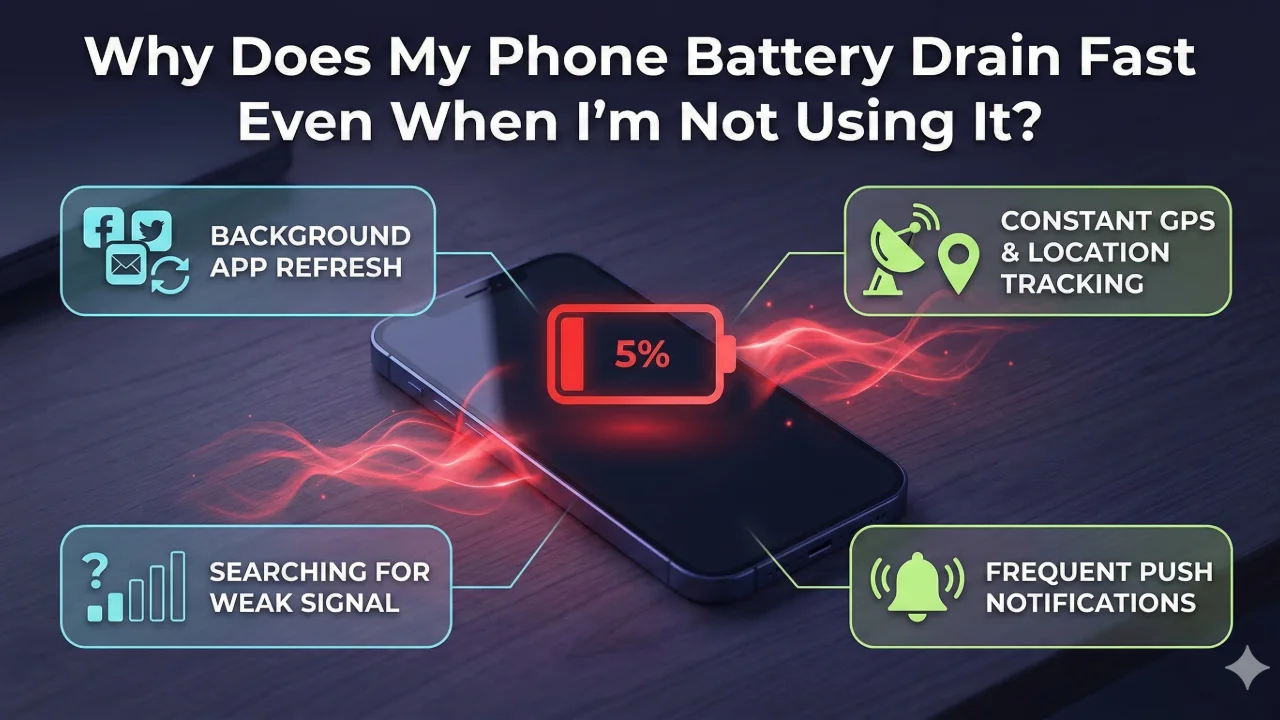
1. Background App Refresh: iOS and Android both let apps periodically refresh content while you’re not using them. Social media apps and email clients are the worst offenders — they’re basically designed on the assumption that you can’t go three minutes without the latest update. Spoiler: you can. Turning this off for non-essential apps is the single highest-impact change most people never make.
2. Always-On Location Services: GPS is brutally power-hungry. Google Maps? Fair enough. But dating apps, retail apps, random social platforms — they’ve all helped themselves to permanent location access, often without you realising it. I’ve audited phones where 22 apps had “Always On” GPS access. The owners had no idea. In my testing, stripping location access down to “While Using” only extended standby time noticeably within a single day. riddit opinion
3. Push Notifications and Server Pings: Every notification is a little wakeup call for your phone — screen on, radio active, processor running, vibration motor firing. Do that 200 times a day and you’ve torched a meaningful chunk of battery before lunch. Multiply that over a month and you’ve got thousands of tiny power draws that nobody ever adds up.
4. Poor Network Signal: This one’s massively underrated. When your phone can’t find a strong cell signal — in a basement, on a train, at a packed stadium — it cranks up its radio power to compensate. Like a person shouting across a loud room, it just keeps going louder and louder until it gets through. That can burn two to three times the normal rate. Airplane Mode isn’t just for planes.
5. Poorly Built Apps: A 2025 report found apps consume up to 30% more power during network transitions — switching from Wi-Fi to cellular — as they flail around trying to reconnect. Gaming apps showed twice the drain compared to productivity apps. And only 28% of mobile dev teams actually test for battery drain before shipping. That means bad code lands on your phone and nobody’s held responsible for it.
⚡ Breaking News (March 2026): Google’s rolling out a policy that forces apps keeping phones awake more than 2 hours a day to display a warning badge — “This app may drain your phone’s battery faster.” Repeat offenders get buried in Play Store rankings. It’s a small step, but it’s the first time a major platform has actually named and shamed the worst culprits publicly.
What You Can Actually Do Right Now
🔄 Kill Background Refresh — iOS: Settings → General → Background App Refresh. Android: Settings → Battery → Battery Usage. Disable it for every social and streaming app. You won’t miss it.
📍 Audit Location Access — Go through each app and switch from “Always” to “While Using” or “Never.” You’ll probably be shocked how many apps have permanent GPS access you never consciously agreed to.
🔔 Ruthless Notifications — Turn off notifications for everything except calls, messages, and the handful of apps where timing actually matters. Your attention and your battery will both thank you.
📶 Mind Your Signal — In weak signal areas, use Wi-Fi Calling if it’s available — or just flip on Airplane Mode when you don’t need connectivity.
🔋 Use Battery Saver Early — Don’t wait until you’re at 10% to turn it on. Use iOS Low Power Mode or Android Battery Saver from the start of a long day.
🔁 Keep Apps Updated — Devs do push real efficiency fixes. After the iOS 26 update in 2025, some iPhone 15 users were losing 30% battery in hours — a patch fixed it within days.
My Controversial Take: This Is a Design Choice, Not a Bug
Let’s drop the polite fiction that any of this is accidental. The apps killing your battery the hardest — Netflix, TikTok, Instagram, Snapchat — are built by companies whose entire business model is built on grabbing as much of your attention as they possibly can, as often as possible. Background refresh isn’t a side effect. It’s the strategy.
Spotify running 13.5 hours of background activity a month isn’t a coding mistake — it’s a deliberate product decision to make sure you get that notification the instant something happens. Instagram silently refreshing while your phone’s locked? It’s preloading the feed so when you open it, everything feels instant and irresistible. Your battery is just the bill they hand to you.
The attention economy has never had to pay for the hardware it burns through. Google’s new warning labels are a start — but they’re still putting the burden on you to notice and react. What we actually need is default-off background refresh at the OS level, where apps have to earn and justify the privilege. Not the other way around.
Until that happens, your battery drain isn’t a malfunction. It’s a feature. One you never opted into.
Frequently Asked Questions
Q1: Does closing background apps actually save battery?
Yes, disabling background app usage slows down battery drain; however, you will still need to keep the important apps enabled.
Q2: Why does my battery drain faster when my signal is weak?
Your phone’s cellular radio keeps cranking up its transmission power when it’s struggling to reach a tower — essentially shouting louder and louder trying to get through. That can mean two to three times normal power consumption. If you’re regularly in low-signal spots, your phone might be running the radio at near-maximum output for long stretches without you even knowing it.
Q3: Is it true that charging to 100% damages the battery?
Yep, there’s real truth to this. Lithium-ion batteries degrade faster when they spend a lot of time at very high or very low charge levels. Most experts recommend staying in the 20–80% range for long-term battery health. Plenty of newer phones — iPhone 15 series, Samsung Galaxy S24+ — now ship with optimised charging features that learn your daily routine and slow down the final phase of charging to reduce wear over time.
Q4: Could my phone have malware that’s draining the battery?
It’s possible. Malicious software can run crypto mining, data exfiltration, or non-stop network pings completely in the background — and all of that burns battery hard. If your drain is sudden and dramatic, your phone feels warm when it’s just sitting there, and your data usage has jumped for no obvious reason — those are the signs worth investigating.
Q5: When should I just replace the battery instead of tweaking settings?
If your iPhone’s Battery Health has dipped below 80%, or your Android is two to three years old and no amount of optimisation is helping — it’s time. A degraded battery simply doesn’t have the chemical capacity it once did. A replacement typically runs $50–$100 and can make a phone that felt dead feel genuinely new again. Cheaper than a new phone. Considerably.
Data sourced from Elevate (UK, 2025), Tech My Trend (2025), Alphabin Mobile QA Research (2025), and Google Play Store policy announcements (2025–2026).