Every time you open WhatsApp, you see a small message at the top of every conversation: “Messages are end-to-end encrypted.” Every time you log into your bank’s app, you see a padlock icon in the browser. Every time you make a UPI payment, your transaction disappears into the internet and arrives safely at the other end.
None of this happens by accident. All of it is protected by a single technology called encryption.
But what exactly is encryption? How does it turn your private messages and bank details into something that hackers cannot read even if they intercept them? And why should every Indian internet user understand how it works?
This guide answers all of those questions in plain, simple language — no technical degree required.
What is Encryption? — The Simple Explanation
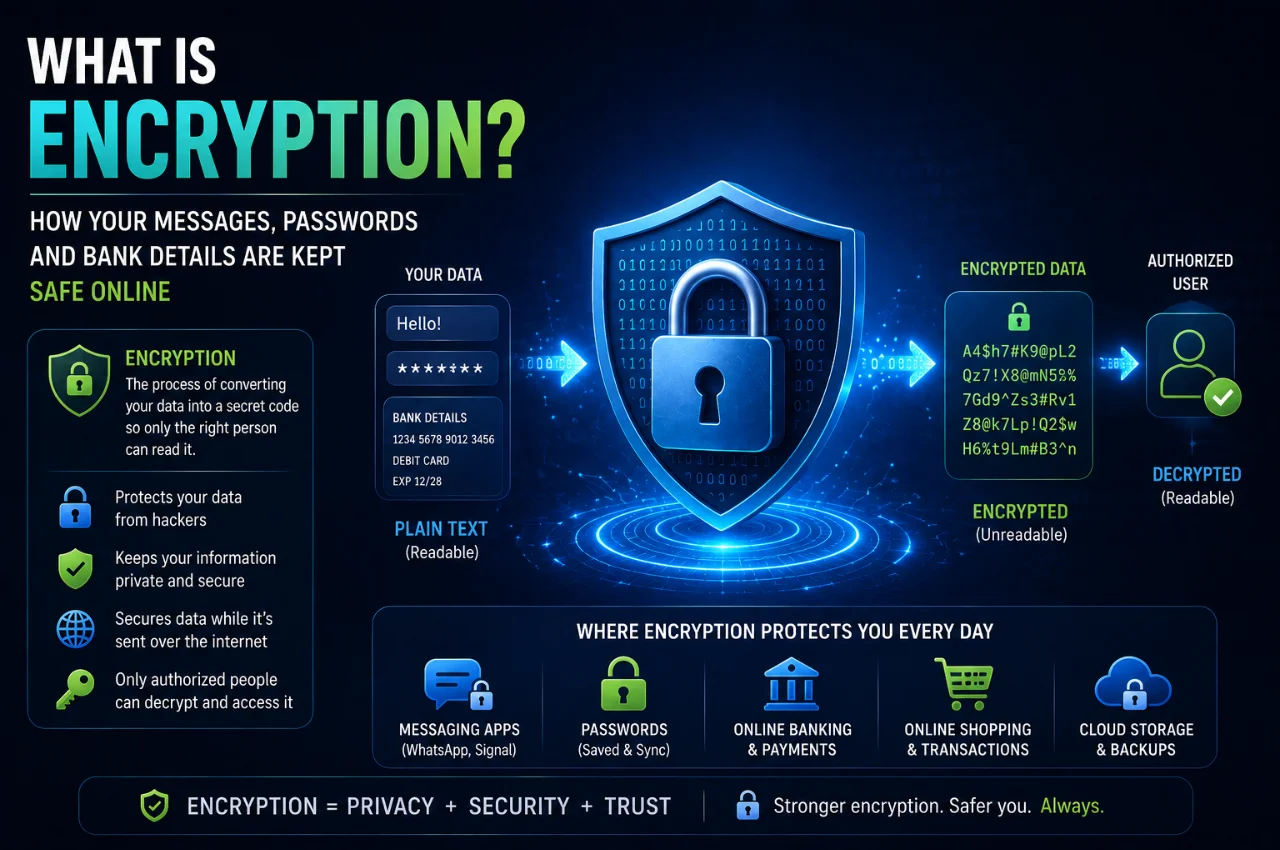
Encryption is the process of converting readable information into a scrambled, unreadable format that can only be decoded by someone with the correct key.
Think of it like a secret code that you and your friend agreed on before sending letters. You write your message in plain English, apply the agreed code to scramble it, and send it. Even if someone intercepts the letter in transit, all they see is meaningless jumbled characters. Your friend receives the letter, applies the reverse code, and reads your original message perfectly.
Digital encryption works on exactly the same principle — except instead of a simple letter-substitution code, it uses extraordinarily complex mathematical algorithms that would take even the most powerful computers millions of years to crack without the correct key.
The original readable information is called plaintext. After encryption is applied, it becomes ciphertext — a scrambled version that is completely unreadable without the decryption key. When the intended recipient receives the ciphertext, their device automatically applies the decryption key and converts it back to readable plaintext.
This entire process — encryption on one end, transmission of ciphertext, and decryption on the other end — happens in milliseconds, invisibly, every single time you send a message, enter a password, or make an online payment.
Why Does Encryption Exist? — The Problem It Solves
To understand why encryption matters so deeply, you need to understand how information travels across the internet.
When you send a WhatsApp message, make a UPI payment, or log into your email, your data does not travel in a straight line from your device to the destination. It passes through dozens of intermediate points — routers, servers, internet exchange points, and networks operated by different companies in different countries. At each of these points, someone with the right tools could theoretically intercept and read the data as it passes through.
Without encryption, every message you send, every password you type, and every payment you make would travel across this network in plain, readable text — visible to anyone positioned along the path who chose to look.
Encryption solves this problem completely. Instead of your bank password traveling as the text “MyPassword123” — which anyone could read — it travels as something like “a3f8b2c91e4d7a6b2c3e8f1d9a4b7c2e” — a meaningless string of characters that reveals nothing about the original data. Even if someone intercepts it, they cannot use it.
This is why encryption is the foundational technology of the modern internet. Without it, online banking, digital payments, private messaging, e-commerce, and virtually every other form of secure digital communication would be impossible.
How Does Encryption Actually Work? — A Step-by-Step Explanation
Let’s walk through exactly what happens when your data is encrypted, in simple terms.
Step one — Your device generates or receives an encryption key. A key in cryptography is a string of data — typically a very long number — that is used to mathematically transform your plaintext into ciphertext. The key determines exactly how the scrambling is performed.
Step two — Your data is passed through an encryption algorithm. An algorithm is a mathematical formula that uses the key to transform your readable data into ciphertext. Modern encryption algorithms are extraordinarily complex — AES-256, for example, uses a 256-bit key, meaning there are 2 to the power of 256 possible key combinations. Written out, that number has 78 digits. A computer trying every possible combination would take longer than the age of the universe to find the right one.
Step three — The ciphertext is transmitted. Your scrambled data travels across the internet. Even if someone intercepts it at any point along the way, all they see is meaningless characters.
Step four — The recipient’s device decrypts the data. The recipient’s device has the correct decryption key. It applies the reverse mathematical process to the ciphertext and converts it back into the original readable plaintext.
Step five — You see the result. Your WhatsApp message appears as text. Your banking page loads with your account details. Your email displays correctly. The entire encryption and decryption process happened invisibly in the background in less than a second.
The Two Main Types of Encryption — Symmetric and Asymmetric
There are two fundamental types of encryption, and understanding the difference helps you understand why different systems handle security differently.
Symmetric Encryption — One Key Does Both Jobs
In symmetric encryption, the same key is used to both encrypt and decrypt the data. The sender uses the key to scramble the message, and the recipient uses the identical key to unscramble it. Both parties must have the same key, and that key must be kept completely secret.
Symmetric encryption is extremely fast, which makes it ideal for encrypting large amounts of data. The most widely used symmetric encryption standard today is AES — Advanced Encryption Standard — specifically AES-256, which is used by governments, militaries, banks, and cloud storage providers worldwide to protect sensitive data at rest.
The challenge with symmetric encryption is the key exchange problem — how do you securely share the secret key with the other person in the first place, before any secure channel exists? If you send the key over an unencrypted connection, an interceptor could steal it.
Asymmetric Encryption — Two Keys Working Together
Asymmetric encryption solves the key exchange problem by using two mathematically linked keys instead of one — a public key and a private key.
The public key is shared openly with anyone who wants to send you a secure message. Anyone can use your public key to encrypt a message meant for you. The private key is kept completely secret and never shared with anyone. Only your private key can decrypt messages that were encrypted with your public key.
Here is how it works in practice: Imagine you have a special locked box with a slot in the top — this is your public key. You give copies of this box to everyone who might want to send you a secret message. Anyone can drop a message through the slot and close the box — this is encryption using your public key. But only you have the key to open the box — your private key — so only you can read the messages inside.
Asymmetric encryption is the technology behind HTTPS — the secure web protocol that protects websites. It is also the foundation of digital certificates, email encryption, and many other security systems.
In practice, most secure systems use both types together — asymmetric encryption to securely exchange a symmetric key, and then symmetric encryption for the actual data transfer. This combines the security advantages of asymmetric encryption with the speed advantages of symmetric encryption.
Encryption in Your Daily Life — Where It Protects You Right Now
Encryption is not an abstract concept that only matters to governments and corporations. It is protecting you at this exact moment, across virtually every digital thing you do.
WhatsApp and Signal — End-to-End Encryption
When WhatsApp displays “Messages are end-to-end encrypted,” it means that your messages are encrypted on your device before they leave and are only decrypted on the recipient’s device. Not even WhatsApp itself can read your messages — the servers that carry your messages only ever see encrypted ciphertext.
Signal uses the same end-to-end encryption model and is widely considered the gold standard for secure messaging. The encryption protocol developed by Signal — the Signal Protocol — is so effective that WhatsApp adopted it for their own encryption system.
This means that even if someone hacks into WhatsApp’s servers, they cannot read your messages. Even if someone intercepts your data in transit across the internet, they see only meaningless ciphertext.
HTTPS — The Padlock in Your Browser
Every time you see HTTPS at the beginning of a web address — and the padlock icon in your browser’s address bar — your connection to that website is encrypted using TLS (Transport Layer Security). This means everything you type on that website — passwords, credit card numbers, personal information — is encrypted before it leaves your device and can only be decrypted by the website’s server.
Without HTTPS, anyone on the same Wi-Fi network as you — at a cafe, airport, or hotel — could use freely available tools to intercept and read everything you type on any website. HTTPS makes this completely impossible.
Always check for HTTPS before entering any sensitive information on a website. If a website shows HTTP without the S — especially on a banking or payment page — do not enter any personal or financial information.
UPI and Online Banking — Encryption at Every Step
Every UPI transaction you make — through PhonePe, Google Pay, Paytm, or any other app — is protected by multiple layers of encryption. Your bank account details, transaction amounts, and authentication credentials are all encrypted before they travel across the network.
The encryption used by the National Payments Corporation of India (NPCI) for UPI is AES-256 — the same standard used by the US military and major governments worldwide. Your UPI PIN is never transmitted in plain text — it is encrypted the moment you enter it on your phone.
This is why UPI is safe to use for large transactions. The encryption ensures that even if someone intercepts the data traveling between your phone and the bank’s server, they cannot extract your PIN, account number, or transaction details.
App Store and Play Store Downloads — Verified and Encrypted
Every app you download from the Google Play Store or Apple App Store is digitally signed using encryption. This digital signature verifies that the app was genuinely created by the developer listed and has not been tampered with after it was submitted. This is why downloading apps from these official stores is significantly safer than downloading them from random websites.
Cloud Storage — Your Photos and Files
When you store photos on Google Drive, iCloud, or OneDrive, those files are encrypted both in transit — as they upload from your phone — and at rest on the company’s servers. This means even if someone were to physically access the storage servers, they would see only encrypted data they cannot read.
Your Phone’s Storage — Device Encryption
Modern Android phones (Android 10 and above) and all iPhones are encrypted by default. This means all data stored on your phone — photos, messages, contacts, banking apps — is encrypted and can only be accessed using your PIN, password, or biometric authentication. If someone steals your phone and removes the storage chip, they cannot read any of the data without your decryption credential.
End-to-End Encryption vs Regular Encryption — What is the Difference?
You have probably seen “end-to-end encrypted” mentioned many times and wondered how it differs from regular encryption. This is an important distinction.
Regular encryption — sometimes called encryption in transit — protects your data as it travels from your device to the service provider’s server. The data is encrypted on the way to the server and decrypted when it arrives. This means the service provider can read your data on their server. Gmail, for example, encrypts your emails in transit, but Google can technically access the content of your emails on their servers.
End-to-end encryption is much stronger. The data is encrypted on your device before it leaves and is only decrypted on the recipient’s device. The service provider’s servers only ever handle ciphertext — they never have access to the decryption key, and therefore can never read your content. WhatsApp, Signal, and iCloud with Advanced Data Protection all offer end-to-end encryption.
For maximum privacy, end-to-end encryption is what you want. For most everyday browsing, banking, and app use, regular TLS encryption in transit is strong and more than adequate.
What is AES-256? — The Gold Standard of Encryption
You will often hear AES-256 mentioned as the benchmark of strong encryption. Here is what it means in simple terms.
AES stands for Advanced Encryption Standard. It is the most widely used symmetric encryption algorithm in the world, adopted as the encryption standard by the US government in 2001 and now used globally for protecting sensitive data.
The “256” refers to the key length — 256 bits. A 256-bit key means there are 2 to the power of 256 possible key combinations. This number is so astronomically large that even if every computer on earth worked simultaneously to try every possible key, they would not crack it before the universe ended.
AES-256 is used by: the US National Security Agency for top-secret classified information, WhatsApp and Signal for message encryption, Google Drive and iCloud for file storage, banks and financial institutions for transaction data, the UPI payment network in India, and most VPN services for connection encryption.
When a service says it uses AES-256 encryption, it means your data is protected by the strongest encryption standard currently available.
Common Encryption Terms Explained Simply
These are the terms you are most likely to encounter and what each one actually means.
Plaintext is your original readable data before encryption is applied — for example, your actual password or message.
Ciphertext is your data after encryption — the scrambled, unreadable version that is transmitted or stored.
Encryption key is the mathematical value used to transform plaintext into ciphertext and back. Without the correct key, ciphertext cannot be decoded.
Algorithm is the mathematical formula used to perform the encryption. AES, RSA, and TLS are examples of encryption algorithms.
TLS — Transport Layer Security — is the protocol that encrypts data between your browser and websites. It is what makes HTTPS work.
SSL — Secure Sockets Layer — is the predecessor to TLS. The terms are often used interchangeably, though TLS is the current standard.
HTTPS — HyperText Transfer Protocol Secure — is the web protocol that uses TLS to encrypt all communication between your browser and a website.
End-to-end encryption means data is encrypted on the sender’s device and decrypted only on the recipient’s device — the service provider cannot access it.
Digital certificate is a verified credential issued to a website by a trusted authority, confirming that the website is genuine and its encryption is valid. This is what the padlock icon in your browser confirms.
Public key is the encryption key that is shared openly — anyone can use it to encrypt a message for you.
Private key is the decryption key that is kept completely secret — only you can use it to decrypt messages encrypted with your public key.
Can Encryption Be Broken?
This is a common question, and the honest answer is: modern strong encryption is effectively unbreakable in any practical sense.
Breaking AES-256 encryption through brute force — trying every possible key combination — would require more computing power than exists on Earth and more time than the universe has existed. No computer, regardless of how powerful, can crack AES-256 in any reasonable timeframe with current technology.
However, encryption can be compromised in other ways that do not involve breaking the mathematics. Weak passwords are the most common vulnerability — if your encryption key is derived from a simple password, that password can be guessed. Poor implementation by developers can create vulnerabilities even in systems using strong encryption algorithms. Malware on your device can capture your data before it is encrypted or after it is decrypted. And social engineering — like phishing attacks — can trick you into handing over credentials that unlock encrypted systems.
This is why strong encryption is necessary but not sufficient for security. Good encryption combined with strong passwords, two-factor authentication, regular software updates, and awareness of phishing attacks provides comprehensive protection.
What Encryption Cannot Do
Encryption is a powerful protection, but it is important to understand its limits.
Encryption protects data in transit and at rest — but once data is decrypted and displayed on a device, it is readable. If malware is on your device, it can capture data after decryption. Encryption does not protect against account takeover — if someone gets your password and logs into your bank account legitimately, the encryption does nothing to stop them. And encryption does not protect against phishing — no encryption can help if you voluntarily give your credentials to a fake website.
Encryption is a layer of protection, not a complete security solution. It works best as part of a broader approach that includes strong passwords, two-factor authentication, updated software, and careful online behavior.
How to Make Sure Encryption is Protecting You
Here are simple, practical steps to ensure encryption is working in your favor.
Always check for HTTPS before entering any password, payment information, or personal data on any website. If the address starts with HTTP without S — leave immediately. Use messaging apps with end-to-end encryption for sensitive conversations — WhatsApp and Signal both provide this. Enable full-device encryption on your phone — all modern iPhones and Android phones running Android 10 or above are encrypted by default, but verify in your Settings that encryption is enabled.
Use a VPN when connecting to public Wi-Fi in cafes, airports, or hotels — a VPN encrypts all your internet traffic, preventing anyone on the same network from intercepting your data. Use strong, unique passwords — since encryption keys are often derived from passwords, a weak password is your biggest vulnerability regardless of how strong the encryption algorithm is. And keep your apps and operating system updated — security vulnerabilities in encryption implementations are patched through updates.
Key Takeaway
Encryption is the invisible shield that makes safe digital life possible. Every WhatsApp message you send, every UPI transaction you complete, every password you enter on a secure website, every photo you store in the cloud — all of it is protected by encryption working silently in the background.
Understanding what encryption is and how it works puts you in a much stronger position to protect yourself online. You now know what the HTTPS padlock means, why end-to-end encryption matters, what AES-256 is, and why strong passwords are your most important contribution to your own encryption security.
The next time you see “Messages are end-to-end encrypted” on WhatsApp, you will know exactly what that means — and why it matters.
Frequently Asked Questions
Is WhatsApp encryption really secure?
Can WhatsApp read my messages? WhatsApp uses end-to-end encryption based on the Signal Protocol, which is genuinely one of the strongest encryption implementations available. WhatsApp’s servers only receive encrypted ciphertext — the company cannot read the content of your messages. However, WhatsApp does collect metadata — who you message, when, and how often — even though it cannot read message content.
What does end-to-end encrypted mean in simple terms?
It means your message is scrambled on your device before it leaves, travels across the internet as unreadable ciphertext, and is only unscrambled on the recipient’s device. Nobody in between — not the internet provider, not the app company, not hackers who intercept the data — can read it.
Is HTTPS enough to keep me safe when banking online?
HTTPS with TLS encryption is the standard security mechanism for online banking and is strong and reliable. However, HTTPS only protects the data in transit. Always verify that the website address is exactly correct — phishing sites can use HTTPS too, meaning the connection is encrypted but the destination is fraudulent.
Can the government or police break encryption to access criminal communications?
Modern AES-256 encryption cannot be mathematically broken even by governments with vast resources. However, authorities can legally compel service providers to hand over data — though end-to-end encrypted systems mean even the provider has nothing to hand over. Authorities can also seize physical devices and attempt to unlock them through legal means. The mathematical encryption itself remains unbroken.
Is my UPI payment information safe from hackers?
Yes — UPI transactions are protected by AES-256 encryption and the NPCI’s security infrastructure. Your UPI PIN is never transmitted in plain text. However, the biggest threat to UPI users is not encryption failure but social engineering — scammers tricking you into sharing your PIN or approving fraudulent payment requests. The encryption is strong; the human element is where fraud occurs.
Does using encryption slow down my phone or internet?
Modern encryption is extremely efficient and the performance impact on current smartphones and internet connections is negligible — you will not notice any slowdown. Encryption processing happens in dedicated chips in modern devices that are specifically designed for this purpose.
Final Thoughts
Encryption is one of the most important technologies ever created. It is the reason online banking exists. It is the reason private communication is possible on the internet. It is the reason e-commerce works. It is the reason your most sensitive personal information can travel across a global public network and arrive safely at its destination.
You do not need to understand the mathematics of AES-256 or the details of asymmetric key exchange to benefit from encryption. You benefit from it automatically, every day, every time you use your phone or the internet.
But understanding what it is, how it works, and what its limits are makes you a smarter, safer digital citizen. Now that you understand encryption, you can make better decisions about which apps to use, how to handle your passwords, and how to recognize when your data is genuinely protected versus when it is at risk.
Your digital security starts with encryption — and now you understand exactly how it is protecting you.