Walk into Croma, Reliance Digital, or scroll through Flipkart and Amazon, and almost every TV on sale is labeled Smart TV. The ones without the Smart label are getting harder to find. But if you have never owned one — or if you have one and are not entirely sure what it can do — the terminology can feel overwhelming fast.
OLED, QLED, Mini-LED, 4K, 8K, Google TV, Android TV, Tizen, webOS, 120Hz, Dolby Vision — every brand uses slightly different language and every product page is packed with terms that assume you already know what they mean.
This guide starts from the beginning. What actually makes a TV “smart,” how the technology inside it works, what you can genuinely do with one, how to choose the right one for your home, and whether buying one in 2026 is actually worth it for your specific situation.
What is a Smart TV?
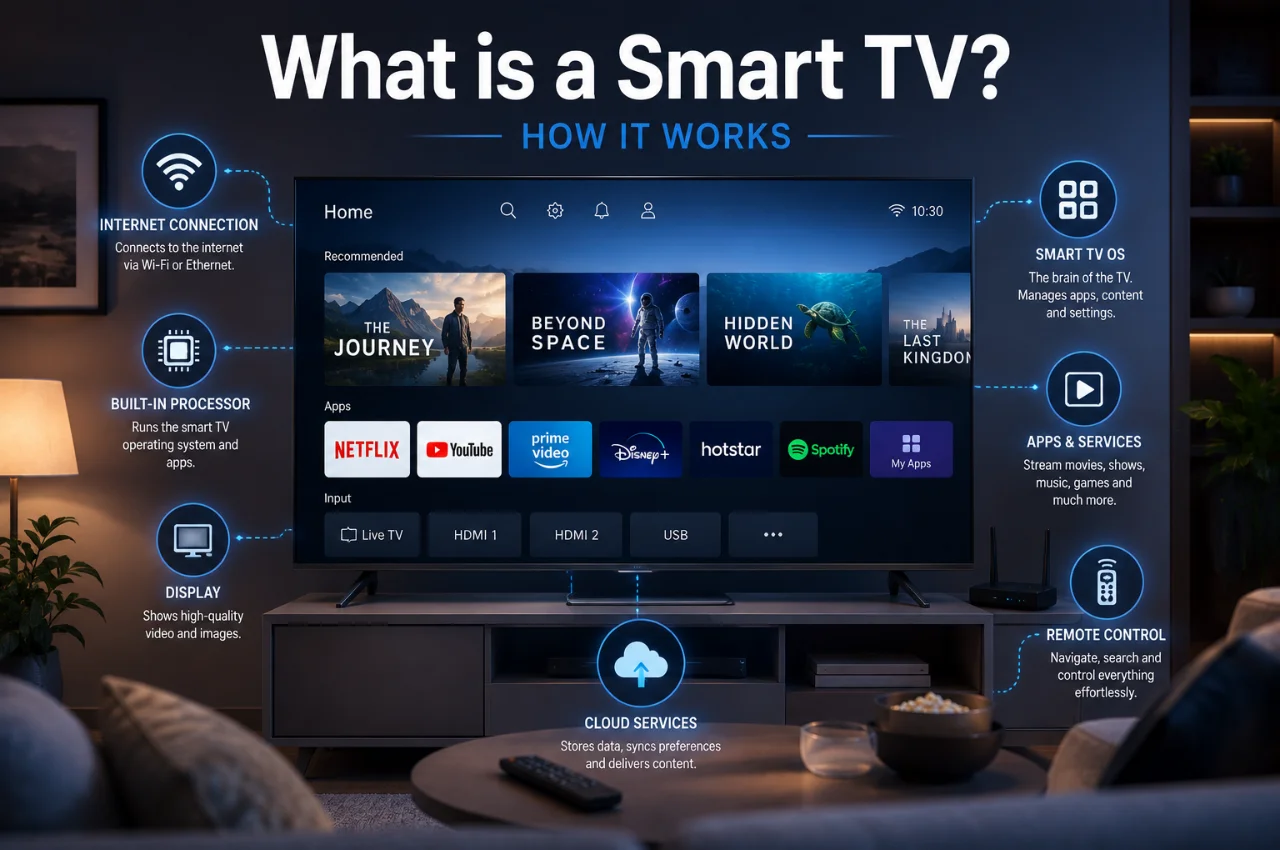
A Smart TV is a television that is connected to the internet and runs an operating system — just like your smartphone — which allows it to run apps, stream content, browse the internet, and communicate with other devices in your home.
A regular television is a display device. You plug in a cable or satellite connection, it shows you whatever is being broadcast, and that is essentially all it does. No internet, no apps, no streaming. The content comes entirely from an external source.
A Smart TV has everything a regular TV has — the display panel, the speakers, the HDMI ports — plus a computer built inside it. That computer runs an operating system, connects to your home Wi-Fi, and gives you access to streaming platforms, YouTube, games, web browsing, and a wide range of apps directly on the TV screen. No separate device required.
The shift is significant. You do not need a separate set-top box to watch Netflix. You do not need a Chromecast or a Fire TV Stick to stream from your phone. Everything is built in. The TV itself is the smart device.
In India in 2026, affordable broadband, the explosion of OTT platforms — Netflix, Amazon Prime Video, JioHotstar, Zee5, SonyLIV — and increasingly aggressive pricing from brands like Xiaomi, TCL, and Hisense have made Smart TVs the standard choice for almost every Indian household buying a new television. The question is no longer whether to buy a Smart TV but which one.
How Does a Smart TV Actually Work?
The technology inside a Smart TV combines several components that work together to deliver the experience you see on screen.
The display panel is the screen itself — the physical layer that produces the image you watch. This is where most of the visible differences between televisions come from, and it is where terms like OLED, QLED, and Mini-LED apply. More on display types in detail shortly.
The processor is the brain of the Smart TV — the chip that runs the operating system, handles app processing, manages video decoding, and controls everything the TV does beyond simply displaying a signal. A more powerful processor means smoother navigation, faster app loading, and better handling of high-resolution content. Budget Smart TVs with weak processors often feel frustratingly slow when switching between apps or opening menus.
The operating system is the software environment that determines your entire Smart TV experience — how the interface looks, which apps are available, how easily you can find content, and how well the TV integrates with other devices. The major operating systems in 2026 are Google TV, Android TV, Samsung Tizen, LG webOS, and Fire TV OS. Each has genuine strengths and weaknesses covered in detail below.
The connectivity hardware includes the Wi-Fi module for wireless internet connection, HDMI ports for connecting external devices like gaming consoles and laptops, USB ports for connecting storage drives and other peripherals, Bluetooth for connecting wireless speakers and headphones, and in some models, an Ethernet port for a wired internet connection.
The remote control has evolved significantly. Most Smart TV remotes now include a microphone for voice commands, allowing you to search for content by speaking rather than typing. Some remotes have reduced to just eight or ten buttons because voice search handles most navigation. A few flagship models include a solar panel on the remote that recharges from ambient light, eliminating battery replacements.
The Smart TV Operating Systems — What You Are Actually Choosing Between
This is the most underrated decision in buying a Smart TV and the one most buyers give the least thought to. The operating system you get with your TV determines your daily experience far more than the processor speed or minor picture quality differences.
Google TV is the current version of Android TV, rebuilt with a more intuitive interface in 2020 and now the most widely used Smart TV platform globally. It is available on Sony Bravia TVs, TCL TVs, OnePlus TVs, Xiaomi TVs, and many others. Google TV has the largest app library of any Smart TV platform — if an app exists for streaming content, it almost certainly exists on Google TV. Google Assistant is built in for voice control. Chromecast functionality is built in, making it very easy to cast content from Android phones and iPhones. For Android phone users — which is the vast majority of Indian smartphone users — Google TV feels immediately familiar and integrates seamlessly with your Google account, YouTube history, and app purchases.
Samsung Tizen is Samsung’s proprietary operating system, used exclusively on Samsung Smart TVs. It is consistently rated as one of the smoothest and most polished Smart TV interfaces available, with a well-organized home screen that prioritizes content discovery. Samsung’s exclusive Samsung TV Plus service provides free channels without any subscription. The app library is slightly smaller than Google TV but covers every major Indian streaming platform. Samsung’s integration with Galaxy phones is tight — screen mirroring and SmartThings home automation work particularly well together.
LG webOS is LG’s platform and is widely praised for having the most user-friendly interface of any Smart TV OS. The Magic Remote — LG’s pointer-style remote — allows you to navigate the interface like a computer mouse, which is genuinely more intuitive than directional pad navigation for many users. WebOS has strong app support and excellent content discovery features. LG’s ThinQ AI integration works with Google Assistant and Amazon Alexa.
Fire TV OS is Amazon’s platform, found on Amazon Fire TV Edition televisions from brands like Xiaomi and other partners, as well as on Amazon Fire TV Stick devices. It is heavily oriented toward Amazon Prime Video content. If you subscribe to Prime and watch a lot of Prime Video, it integrates extremely well. Outside of Amazon content, it can feel like the other platforms have better content discovery.
The honest recommendation for most Indian users in 2026: Google TV is the most practical choice because of its comprehensive app support, seamless Android phone integration, and the broadest availability of Indian streaming apps. Samsung Tizen is the better choice if you are buying a Samsung TV and already use Samsung phones and home devices.
Display Technologies Explained Simply
The display panel is what makes the biggest difference to picture quality, and the terminology around it is genuinely confusing because every manufacturer uses slightly different names for similar technologies.
LED LCD is the foundational technology that most affordable and mid-range Smart TVs use. An LCD panel — a layer of liquid crystals that block or allow light to pass through — is backlit by LED lights. The LED backlight is always on, and the LCD layer controls which parts of the image appear bright or dark. The limitation of this approach is that truly deep blacks are difficult to achieve, because the backlight leaks through even when the LCD is trying to block it. This results in a lighter, less defined dark image compared to OLED.
QLED adds a Quantum Dot layer between the backlight and the LCD panel. Quantum Dots are nanoscale semiconductor particles that convert light to a very specific color with great accuracy. The result is significantly wider color coverage and higher peak brightness than standard LED LCD, without the black level issue being fully resolved. Samsung pioneered and markets QLED extensively. At its best, QLED produces vivid, punchy images that excel in bright rooms. Neo QLED is Samsung’s implementation using Mini-LED backlighting with Quantum Dots — delivering better black level control alongside the color advantages of Quantum Dot.
OLED is a fundamentally different display technology where each pixel produces its own light rather than being backlit. When an OLED pixel needs to display black, it simply turns off — consuming zero power and producing zero light. This produces truly infinite contrast — the deepest blacks physically possible on a screen — and exceptional color accuracy. LG is the dominant manufacturer of OLED panels, supplying LG, Sony, and other brands. OLED’s weakness is that it can struggle with peak brightness compared to the best QLED and Mini-LED implementations, which matters in very brightly lit rooms.
Mini-LED is an evolution of LED backlighting that uses thousands of tiny LED lights instead of a smaller number of larger ones. More, smaller LEDs mean much more precise local dimming — the ability to dim specific zones of the backlight independently. TCL’s Mini-LED implementation has been particularly praised in India’s mid-premium segment for delivering OLED-like contrast at significantly lower prices.
For most Indian living rooms, which tend to be well-lit with windows and overhead lighting during daytime viewing, a good QLED or Mini-LED TV often delivers a better practical experience than OLED in that specific context — because OLED’s advantages are most visible in dark rooms while QLED and Mini-LED’s high brightness is most useful in bright conditions. For dedicated home theatre setups in controlled lighting, OLED’s contrast advantage becomes more significant.
Screen Resolution — 4K, 8K, and What You Actually Need
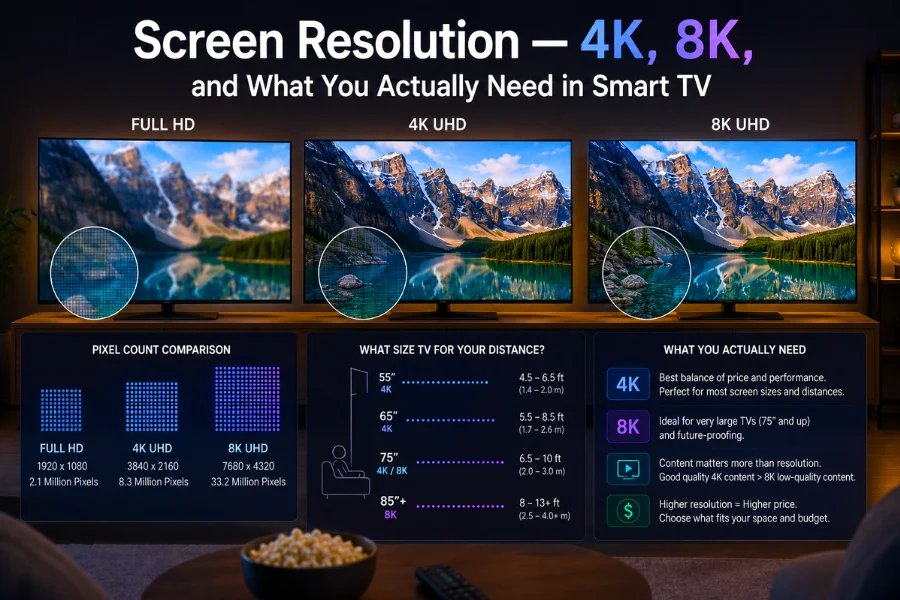
Resolution refers to the number of pixels on the screen. More pixels mean more detail and sharper images, up to the point where your viewing distance makes additional pixels invisible.
Full HD (1080p) is 1920 x 1080 pixels. This was the standard for years and is still perfectly adequate for screens up to about 40 inches viewed from normal living room distances.
4K Ultra HD is 3840 x 2160 pixels — four times the resolution of Full HD. In 2026, 4K is the standard resolution for any Smart TV above 43 inches in India. The difference between Full HD and 4K is clearly visible on a 50-inch or larger screen at normal viewing distances, particularly in detailed scenes like sports, nature documentaries, and cinematic content. Most premium OTT content on Netflix, Amazon Prime Video, and JioHotstar is now available in 4K.
8K is 7680 x 4320 pixels — sixteen times the resolution of Full HD. Samsung and LG both sell 8K TVs in India. At current viewing distances and content availability, 8K offers no visible benefit for almost any Indian buyer. Virtually no streaming content is produced or available in 8K. The premium paid for 8K resolution in 2026 is not justified for consumer use.
The practical recommendation for most Indian buyers: 4K is the right choice for any screen 43 inches or above. For screens below 43 inches, particularly bedroom TVs, Full HD is often visually indistinguishable from 4K at normal viewing distances.
What Can You Actually Do With a Smart TV?
This is the question most buyers care about most, and the answer in 2026 is significantly broader than most people expect.
Streaming is the primary use case. Every major Indian and international OTT platform has a dedicated Smart TV app — Netflix, Amazon Prime Video, JioHotstar, Zee5, SonyLIV, YouTube, MX Player, Disney+ Hotstar, Apple TV Plus, and many more. You open the app, sign into your account, and browse the catalog directly on your TV screen with full remote control navigation and voice search.
Screen mirroring lets you display your phone’s screen on the TV. Watching a video on your phone and want to see it on the big screen? Mirror it. Showing holiday photos to the family? Mirror them from your phone’s gallery. Giving a presentation from your laptop? Mirror it. Both Android phones and iPhones support wireless screen mirroring to most Smart TVs without any cables.
Gaming has improved significantly on Smart TVs. Most 2024 and 2026 Smart TVs support a dedicated Game Mode that reduces input lag — the delay between pressing a controller button and seeing the action on screen. For casual gaming and mobile game mirroring, Smart TVs work well. For serious console and PC gaming, a dedicated gaming monitor with higher refresh rates remains a better choice.
Video calling has become a practical Smart TV feature following the widespread adoption of external webcam accessories and built-in cameras on some models. Attending a family video call on a 55-inch screen with the family gathered in the living room is a genuinely different and better experience than crowding around a phone screen.
Smart home control through Samsung SmartThings, LG ThinQ, or Google Home integration lets you control connected home devices — lights, thermostats, door cameras, and other smart devices — directly from your TV’s interface. Useful if you have already built out a smart home ecosystem.
Web browsing is available on most Smart TVs, though the experience is generally inferior to browsing on a phone or computer. The remote is not optimized for text input and the browser performance is modest. It is useful for quick lookups but not for extended browsing sessions.
Music and audio streaming — Spotify, YouTube Music, and other audio apps run directly on Smart TVs. Useful when you want background music playing through your TV’s speakers or a connected soundbar while relaxing.
Smart TV vs Regular TV Plus a Streaming Device — Which Makes More Sense?
This is a legitimate question and deserves an honest answer rather than a reflexive “just get the Smart TV.”
A regular television — increasingly difficult to find new in India but available in the second-hand market — costs less than a comparable Smart TV. Adding a streaming device like an Amazon Fire TV Stick (₹2,499), a Chromecast with Google TV (₹3,999), or an Apple TV (₹14,900) adds streaming capability. The theoretical advantage is that when the streaming technology gets outdated, you replace the cheap stick rather than the expensive television.
In practice, for most Indian buyers in 2026, a Smart TV makes more sense than this combination for several reasons. Entry-level Smart TVs in India start at approximately ₹8,000 to ₹12,000 for basic 32-inch models and ₹18,000 to ₹25,000 for 43-inch 4K models — the price premium over a comparable non-smart television is small enough that the cost argument for separate devices no longer holds as convincingly. Smart TV operating systems, particularly Google TV on Sony and TCL, are receiving regular software updates that keep the platform current. And the integrated experience — one remote, no extra devices cluttering the setup, no HDMI switching — is genuinely more convenient.
The legitimate case for a separate streaming device is if you already own a good regular TV that you do not want to replace and simply want to add streaming capability to it. In that scenario, a Fire TV Stick or Chromecast is an excellent, affordable solution.
Price Guide — What to Expect at Different Budgets in India 2026
Budget segment up to ₹15,000 covers 32-inch to 40-inch Smart TVs suitable for bedrooms and smaller spaces. At this price, expect Full HD resolution, basic LED LCD panels, adequate but not impressive picture quality, and functional smart TV software. Brands performing well here include Xiaomi, TCL, and croma.
Mid-range ₹15,000 to ₹40,000 covers 43-inch to 55-inch 4K Smart TVs and is where most Indian living room TV purchases now happen. This range has improved dramatically in the past two years. You can find genuine QLED panels, Google TV software, solid sound, and good build quality at the upper end. TCL, Xiaomi, OnePlus, Hisense, and Vu are strong value options here.
Upper mid-range ₹40,000 to ₹80,000 covers 55-inch to 65-inch 4K Smart TVs with noticeably better panels, more refined software, better sound systems, and more reliable build quality. Sony’s mid-range Bravia lineup, Samsung’s Crystal and Frame TVs, and LG’s NanoCell range sit here.
Premium above ₹80,000 covers large-screen flagship TVs with OLED, Neo QLED, or premium Mini-LED displays, advanced AI picture processing, high-end audio systems, and features like 120Hz refresh rates optimized for gaming. Samsung Galaxy S series TVs, LG C4 and G5 OLED range, and Sony Bravia 7 and 8 series compete at this level.
Is a Smart TV Worth Buying in India in 2026?
For most Indian households — yes, clearly.
If you watch any OTT content at all — Netflix, Prime Video, JioHotstar, YouTube — a Smart TV eliminates the need for any separate streaming device and delivers a better interface than most external streaming sticks. The convenience of a single remote and an integrated system is real.
If you have a family and a living room and want to make the most of your entertainment setup, the difference between watching on a phone or laptop versus a good 50-inch Smart TV is substantial.
If your household watches cricket, Hindi serials, movies, or international content regularly, the OTT ecosystem on Smart TVs is where almost all premium content now lives. Cable and satellite setups are not disappearing, but they are no longer where the best content is.
The specific cases where a Smart TV may not be the priority purchase right now: if your current television is less than three years old and works fine, adding a ₹2,499 Fire Stick may be the more sensible investment. If you primarily watch news and local broadcast content through cable, the streaming features of a Smart TV may not see much use. And if your home internet connection is unreliable, the “smart” capabilities of any Smart TV will be limited by the connectivity available.
Key Things to Check Before Buying
Before finalizing any Smart TV purchase, run through this checklist.
Screen size for your room: measure the distance from your sofa to where the TV will sit. Divide that distance in centimeters by 2.5 to get the approximate ideal screen diagonal in inches. A 3-meter viewing distance suggests approximately a 55-inch TV.
Operating system: confirm which OS the TV runs and whether it supports the streaming apps you use most. All major Indian OTT platforms are available on Google TV, Samsung Tizen, and LG webOS. Confirm before buying rather than assuming.
RAM and storage: Smart TV performance is heavily influenced by the amount of RAM and internal storage available for the operating system and apps. Minimum acceptable is 2GB RAM and 16GB storage. 3GB RAM and 32GB storage is noticeably smoother for day-to-day navigation. 4K and gaming TVs benefit from higher specifications.
HDMI 2.1 for gaming: if you own a PS5, Xbox Series X, or plan to connect a gaming PC, confirm that the TV has at least one HDMI 2.1 port, which supports 4K at 120fps. HDMI 2.0 ports cap out at 4K 60fps.
After-sales service: check the brand’s service network in your city. Samsung, LG, and Sony have well-established service networks across India. Newer value brands may have more limited service availability, which matters when warranty claims need to be processed.
Frequently Asked Questions
Do I need a separate set-top box with a Smart TV?
Not for streaming apps. A Smart TV has Netflix, Prime Video, YouTube, and all major OTT apps built in — you do not need a Fire Stick, Chromecast, or any external streaming device. If you want to continue watching cable or DTH channels, you will still need a set-top box for those channels, but it is not required for streaming.
Does a Smart TV work without internet?
Yes — a Smart TV works as a regular TV without internet. You can still connect a cable or DTH set-top box, a DVD player, a gaming console, or any HDMI device and use the TV normally. The smart features — streaming apps, voice assistants, software updates — require an internet connection but are not needed for basic TV functionality.
Is 4K Smart TV worth buying if most Indian TV channels broadcast in HD?
Yes, for two reasons. Most premium OTT content — Netflix Originals, Amazon Prime Video series, the best sports broadcasts — is now available in 4K. And even when watching HD content, a 4K TV’s upscaling processor enhances the image to look sharper on the larger screen. The 4K resolution is most visible on screens of 43 inches and above at normal viewing distances.
Which Smart TV brand is best in India in 2026?
For premium quality: Sony and Samsung. For best value at mid-range: TCL and Xiaomi. For best software experience on a budget: any TV running Google TV. For best OLED picture quality: LG. The right choice depends on your budget, room size, and which OTT platforms you use most.
Can I use a Smart TV as a computer monitor?
Yes — most Smart TVs have HDMI inputs that accept a laptop or desktop PC connection. The resolution and image quality are fine for casual use. However, Smart TVs are not optimized for close-distance computer work — the pixel density at typical TV sizes viewed from normal TV distances means text can look softer than on a dedicated monitor. For gaming at distance and media consumption, a Smart TV works well as a display. For extended office work, a dedicated monitor is more appropriate.
How long does a Smart TV typically last?
The display panel in a quality Smart TV typically lasts ten to fifteen years of normal use before significant degradation. The software and smart features may become outdated faster — a TV with an aging operating system that no longer receives app updates may feel obsolete in seven to ten years even if the display is still functioning well. Buying a TV from a brand with a strong software update commitment — Samsung, LG, and Sony being the most consistent in India — helps extend the useful life of the smart features.
Final Thoughts
A Smart TV in 2026 is less a luxury and more an infrastructure choice — the same category of decision as choosing a Wi-Fi router or a mobile plan. OTT streaming has become where the best content lives, and a Smart TV is the most natural way to access that content on a screen that does it justice.
The buying decision is not complicated once you know what you are looking at. Figure out your room size and appropriate screen diagonal. Choose an operating system that supports your preferred apps. Set a realistic budget. And within that budget, prioritize the display panel quality and the processor — because those two things determine the daily experience more than any specification on the box.
The era of the regular television is not quite over in India, but the Smart TV has already won the market. In 2026, almost every new television sold in India is smart. The question is simply which smart television is right for your living room.