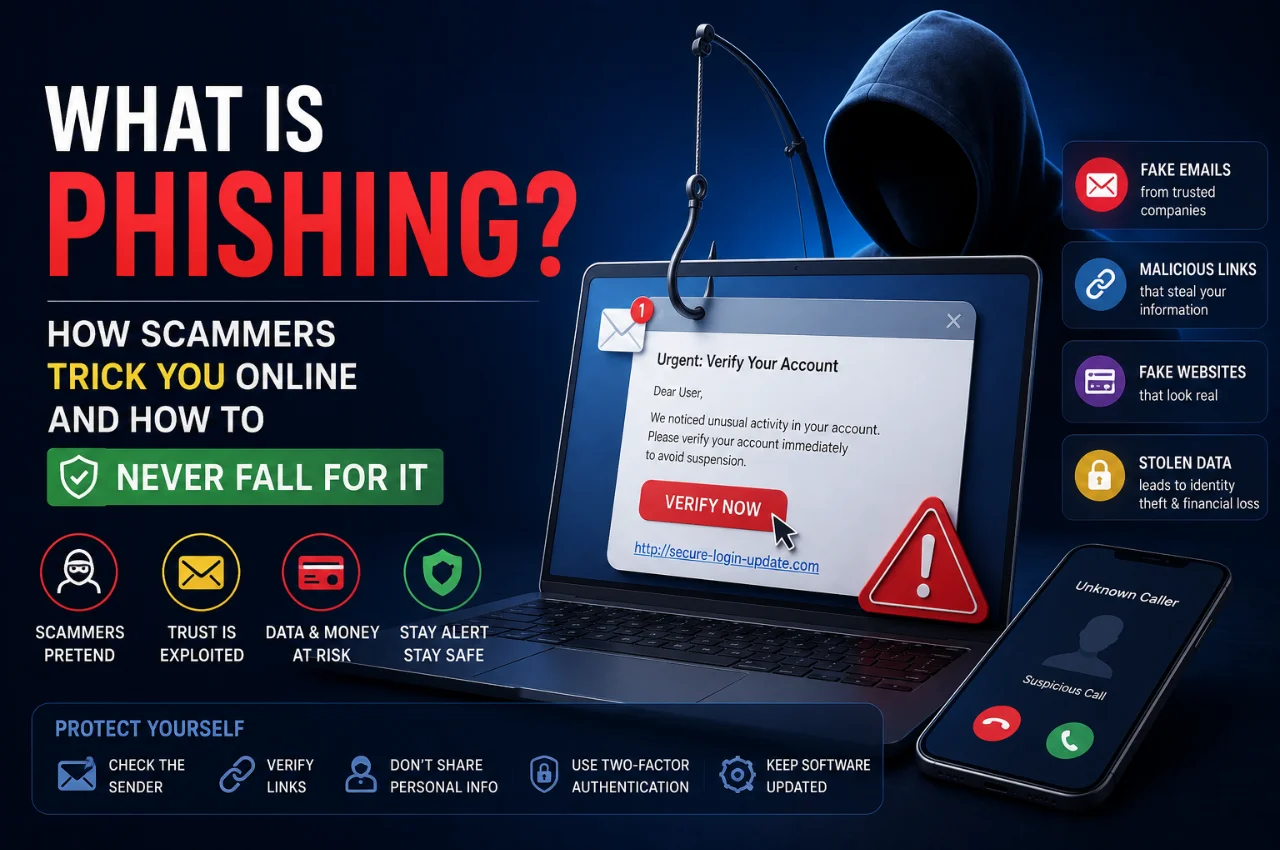
You receive an SMS from what appears to be your bank. It says your account has been temporarily suspended. There is a link to verify your details. The message looks completely official — the bank’s name, the right logo, professional language. You click the link, enter your account number and password, and submit. Within minutes, your account is drained.
This is phishing. And in India, it happened nearly 79 million times in a single year — making India one of the most targeted countries for phishing attacks in the world.
Phishing is not a new scam. But in 2026, it has become more sophisticated, more convincing, and more dangerous than ever before — powered by artificial intelligence and automation that makes fake messages nearly indistinguishable from real ones.
This guide explains exactly what phishing is, how every major type of phishing scam works, how to spot them before it is too late, and the specific steps you can take today to make sure you never fall for one.
What is Phishing?
Phishing is a type of cybercrime where a scammer pretends to be a trustworthy person or organization — a bank, a government agency, a popular company, or even someone you know — in order to trick you into giving them sensitive information like passwords, bank account details, OTPs, credit card numbers, or Aadhaar information.
The name “phishing” is a deliberate misspelling of “fishing” — because the concept is exactly the same. A fisherman throws bait into the water hoping a fish will bite. A phishing scammer throws a convincing fake message at thousands of people hoping that some of them will click, trust, and hand over their personal information.
What makes phishing so dangerous is that it does not require any technical hacking. The scammer does not need to break into your bank’s systems or crack your password. They simply trick you into giving your information voluntarily — by creating a scenario that feels urgent, legitimate, and completely real.
Phishing is now the single most common form of cybercrime globally and the leading cause of financial fraud in India. Understanding it is not optional — it is essential for anyone who uses the internet, a smartphone, or a bank account.
How Does Phishing Work? — The Step-by-Step Process
Every phishing attack, regardless of the type, follows the same basic pattern. Understanding this pattern helps you recognize attacks before they succeed.
Step one is selection. The scammer chooses a target — either a specific individual they have researched, or a massive group of random people. Bulk phishing sends the same fake message to millions of people at once, hoping a percentage will fall for it.
Step two is impersonation. The scammer creates a convincing fake identity. They might forge an email that looks like it comes from SBI, HDFC, IRCTC, Amazon, or even your company’s IT department. They might clone a website so perfectly that it is visually identical to the real one. They might use a phone number that appears to be from an official source.
Step three is the hook. The scammer delivers a message designed to trigger an emotional response — usually urgency, fear, or excitement. “Your account will be closed in 24 hours.” “You have won a prize — claim now.” “Suspicious activity detected on your card.” “Your KYC is incomplete — update immediately.” These triggers bypass rational thinking and push people to act quickly without verifying.
Step four is the trap. The message contains a link to a fake website, an attachment containing malware, or a request for you to call a fake customer care number. If you click the link and enter your details, those details go directly to the scammer. If you open the attachment, malware installs on your device. If you call the number, a trained scammer walks you through giving up your information verbally.
Step five is exploitation. With your credentials, OTP, or card details in hand, the scammer moves fast. They log into your bank account, transfer funds, make purchases, sell your data on dark web markets, or use your identity to commit further fraud.
The entire process from step one to step five can happen in under ten minutes.
The 8 Most Common Types of Phishing in India — With Real Examples
Phishing is not a single type of attack. It has evolved into multiple sophisticated variants. Here is every major type you need to know about, with practical examples.
Email Phishing
The most common and oldest form. You receive an email that appears to come from a trusted source — your bank, Amazon, Netflix, the Income Tax Department, or IRCTC. The email informs you of an urgent problem and contains a link to a website that looks exactly like the real one. When you enter your login details on this fake site, the scammer captures them instantly.
Real example: An email appearing to come from HDFC Bank says your net banking account has been flagged for suspicious activity and will be blocked unless you verify your details within 12 hours. The link leads to a website that looks identical to HDFC’s actual login page. Every detail you enter goes straight to the scammer.
SMS Phishing — Smishing
Phishing attacks delivered via SMS are called smishing. These are particularly effective because people tend to trust text messages more than emails and are more likely to click links in SMS without thinking. The messages often impersonate banks, delivery companies, or government agencies.
Real example: You receive an SMS that appears to be from India Post saying your package could not be delivered and you need to pay a small customs fee to release it. The link leads to a fake payment page that steals your card details.
Voice Phishing — Vishing
Vishing is phishing conducted through phone calls. A scammer calls you pretending to be a bank official, an income tax officer, a telecom customer care executive, or even a police officer. They create urgency or fear and pressure you into sharing OTPs, Aadhaar numbers, account details, or card information over the phone.
Real example: You receive a call from someone claiming to be from your bank’s fraud department. They say your card has been used for a suspicious transaction and they need to verify your identity. They ask you to read out the OTP sent to your phone to “block the fraudulent transaction.” The OTP actually authorizes a real transaction they are initiating.
No legitimate bank or government agency will ever ask you for an OTP, PIN, or password over the phone. Ever. This is the single most important rule to memorize.
Spear Phishing
Unlike bulk phishing that targets thousands of random people, spear phishing targets a specific individual using personal information. The scammer researches you on social media, LinkedIn, or leaked databases before crafting a message that feels personally relevant and credible.
Real example: You posted on LinkedIn about starting a new job. A scammer crafts an email appearing to come from your new company’s IT department asking you to set up your work account through a provided link. Because the message references your actual new employer, you trust it.
WhatsApp Phishing
India-specific and extremely common. Phishing attacks are increasingly delivered through WhatsApp — fake job offers, fake lottery wins, fake customer care numbers for popular companies, and messages forwarded through groups that contain malicious links or request personal information.
Real example: You receive a WhatsApp message claiming you have won a prize from Amazon in their anniversary celebration. You are asked to share the message with 20 friends and then fill in your details to claim the reward. Your data is collected and the promised prize never arrives.
QR Code Phishing — Quishing
A rapidly growing new form of phishing in India. Scammers create fake QR codes that, when scanned, take you to a phishing website or trigger a payment. QR codes are particularly dangerous because most people cannot read what a QR code contains before scanning it.
Real example: A scammer sticks a fake QR code over the legitimate QR code at a petrol station or shop. When you scan it to pay, you are taken to a fake payment page. Your card details or UPI credentials are captured.
Tech Support Phishing
You receive a pop-up on your screen or a call claiming that your device has been infected with a virus and you must call a number immediately. When you call, the fake “technician” gains remote access to your device, steals your data, or installs actual malware.
Real example: A scary pop-up appears on your screen while browsing that looks like a Windows security alert, with a loud alarm sound, saying your computer is infected and all your banking data is at risk. It displays a toll-free number to call. The number connects to a scammer in a call centre.
AI-Powered Deepfake Phishing
The newest and most dangerous form of phishing in 2026. Artificial intelligence allows scammers to clone voices, create realistic video calls, and generate phishing emails that are perfectly written with no grammatical errors — making them nearly impossible to distinguish from genuine communications by appearance alone.
Real example: You receive a video call that appears to show your company’s CFO asking you to urgently transfer funds to a vendor account. The face and voice look and sound completely real. But it is an AI-generated deepfake, and the account belongs to the scammer.
How to Spot a Phishing Attempt — 12 Warning Signs
Even sophisticated phishing attacks almost always have at least one tell. Train yourself to look for these warning signs in every message you receive.
Warning sign one — Urgency and fear. Legitimate organizations do not threaten to close your account, arrest you, or cancel your service within hours. Any message creating extreme urgency is designed to stop you from thinking calmly.
Warning sign two — Unexpected contact. If you did not initiate contact with your bank or a company, and they are suddenly reaching out with urgent demands — be suspicious. Banks do not randomly ask customers to verify credentials without a prior service request.
Warning sign three — Suspicious link URL. Before clicking any link, check the web address carefully. Phishing links often contain subtle misspellings — sbi-secure-login.com instead of sbi.co.in, or amazon-india-offers.com instead of amazon.in. Legitimate companies use their exact official domains.
Warning sign four — Request for OTP or PIN. No legitimate bank, government agency, or company will ever ask you for your OTP, ATM PIN, internet banking password, or CVV number. These are yours alone. Anyone asking for them is attempting fraud.
Warning sign five — Generic greetings. Phishing emails often address you as “Dear Customer” or “Dear User” rather than your actual name. Your bank knows your name and uses it.
Warning sign six — Mismatched sender address. Check the actual email address, not just the display name. A phishing email may display “HDFC Bank” as the sender name but the actual address might be hdfc.support@randomdomain.xyz.
Warning sign seven — Poor grammar or unusual language. Many phishing messages contain grammatical errors, unusual phrasing, or awkward sentence structures — though AI-generated phishing in 2026 has significantly reduced this tell.
Warning sign eight — Requests to download files. Legitimate companies rarely send unexpected attachments asking you to open them urgently. Unexpected attachments are among the most common ways malware is delivered.
Warning sign nine — Too-good-to-be-true offers. If you have won a prize, a lottery, or a job opportunity that you did not apply for — it is a scam. There is no such thing as free money from a company you have no relationship with.
Warning sign ten — QR codes from unknown sources. Never scan a QR code received from an unknown sender or found in an unexpected place. Always verify QR codes at shops and payment counters are securely attached and match the business name.
Warning sign eleven — Caller asking you to act in secret. Any caller who tells you not to tell your family members, not to contact your bank directly, or to keep the conversation confidential is attempting fraud. Legitimate officials never demand secrecy.
Warning sign twelve — The situation feels engineered to panic you. Fear, urgency, and panic are the scammer’s most powerful tools. If a message or call makes you feel you must act immediately without time to think — pause, hang up, and verify through official channels.
How to Protect Yourself — 10 Practical Rules That Work
These are not vague suggestions. These are specific, actionable steps that will protect you from the vast majority of phishing attacks.
Rule one — Never click links in unsolicited messages. If you receive an email or SMS asking you to click a link and log into any account — do not click it. Instead, open your browser, type the official website address manually, and log in from there. Your account will show any genuine alerts.
Rule two — Verify before you act. If you receive any call or message claiming to be from your bank or a government agency with an urgent request — hang up and call the official customer care number directly. Find the number on the back of your card or on the official website — not the number provided in the suspicious message.
Rule three — Enable two-factor authentication on all important accounts. Even if a scammer gets your password, two-factor authentication means they also need access to your phone to complete the login. Enable it on your email, banking apps, and all social media accounts.
Rule four — Never share OTPs with anyone. Your One-Time Password is your final line of defense. Bank staff, government officials, and tech support agents will never legitimately ask for it. If anyone asks for your OTP — it is fraud, without exception.
Rule five — Check URLs carefully before entering any information. Before typing your password or card details on any website, look at the address bar. Ensure the domain is exactly correct. Look for the padlock icon — but note that a padlock alone does not guarantee a site is legitimate, only that the connection is encrypted.
Rule six — Keep your phone and devices updated. Software updates include security patches that protect against known malware and vulnerabilities. An outdated phone or computer is significantly more vulnerable to phishing-delivered malware.
Rule seven — Use a spam filter and security app. Most email providers have built-in spam filters that catch many phishing emails. On your phone, ensure Google Play Protect is enabled — it scans apps and links for malicious activity.
Rule eight — Be careful what you share on social media. Scammers who conduct targeted spear phishing research their victims on Facebook, Instagram, and LinkedIn. Limiting what personal information is publicly visible reduces how precisely attackers can target you.
Rule nine — Report suspicious messages. In India, you can report cybercrime at cybercrime.gov.in or by calling the National Cybercrime Helpline at 1930. Reporting phishing attempts helps authorities track scammers and warn others.
Rule ten — Trust your instincts. If something feels wrong — the message is too urgent, the offer is too good, the caller is too insistent — trust that feeling. Pause. Verify. Never let anyone rush you into sharing financial information.
What to Do If You Have Already Fallen for a Phishing Attack
Acting quickly after a phishing attack significantly reduces the damage. Here is exactly what to do in order.
First, do not panic — act immediately. Every minute matters when financial fraud is involved.
Second, contact your bank immediately. Call your bank’s 24-hour customer care number and report that your account credentials have been compromised. Ask them to freeze your account and block your card if card details were shared. Most banks can reverse unauthorized transactions if reported within a few hours.
Third, change your passwords immediately. Change the passwords for all accounts where you use the same credentials — email, banking, social media, and any other important services. Do this from a different device if possible.
Fourth, report to the National Cybercrime Helpline. Call 1930 or file a complaint at cybercrime.gov.in. Keep records of the phishing message, the website URL, and any transaction details. You can also report to India’s official Computer Emergency Response Team at cert-in.org.in
Fifth, check your accounts for unauthorized activity. Review your bank statements, credit card statements, and transaction history for any charges or transfers you did not make.
Sixth, warn your contacts. If your email or social media account was compromised, the scammer may send phishing messages to your contacts pretending to be you. Alert your contacts not to open any suspicious messages appearing to come from you.
Seventh, if malware may have been installed — such as if you opened a suspicious attachment — consider having your device scanned by a reputable security professional or performing a factory reset if the infection is serious.
India-Specific Phishing Scams to Watch For in 2026
Phishing in India has local flavors that are particularly common and effective. These are the specific scenarios that Indian users most frequently encounter.
Fake KYC update scams target users of banks, telecom operators, and investment platforms. You receive a message or call claiming your KYC is incomplete and your account or SIM will be blocked unless you update it immediately through a provided link.
Fake income tax refund scams arrive as emails or SMS claiming you have a pending income tax refund and need to submit your bank details to receive it. The Income Tax Department communicates through its official portal only and never collects bank details through SMS links.
Fake TRAI SIM deactivation calls involve callers claiming to be from TRAI or the Department of Telecommunications, saying your SIM is being deactivated due to illegal activity. They threaten you with arrest and demand personal information to resolve the issue.
Fake delivery scams impersonate India Post, Amazon, Flipkart, or other courier services with messages claiming your package has been held and requires a small customs payment or address verification through a link.
Digital arrest scams are a relatively new and extremely alarming category where callers claim to be from the CBI, ED, or police and tell you that you are being digitally arrested for a crime — money laundering, illegal parcels in your name, or similar charges. They keep victims on extended video calls to prevent them from consulting anyone else. No law enforcement agency in India conducts “digital arrests” — this is entirely fraudulent.
Fake job offer scams target job seekers with messages on WhatsApp or LinkedIn offering work-from-home jobs with unusually high pay. They ask for a registration fee, a security deposit, or personal documents to complete the hiring process.
Key Takeaway
Phishing is the most widespread cybercrime in India and in the world. It works not because people are careless or unintelligent — it works because scammers are skilled at exploiting human psychology, creating convincing fake environments, and engineering situations that trigger panic and bypass rational thinking.
The single most powerful protection against phishing is simple awareness. When you know how these scams work, you can recognize the warning signs, pause before acting, and verify through official channels before sharing any sensitive information.
Remember these three rules above everything else: Never share your OTP with anyone. Never click links in unsolicited messages. Always verify unexpected requests by calling official numbers directly.
These three habits alone will protect you from the vast majority of phishing attacks targeting Indian users today.
Frequently Asked Questions
What is the difference between phishing, smishing, and vishing?
Phishing is the general term for scams that impersonate trusted organizations to steal information. Smishing is phishing delivered via SMS text messages. Vishing is phishing conducted through voice phone calls. All three use the same psychological manipulation — only the delivery channel differs.
Can phishing happen on WhatsApp?
Yes, absolutely. WhatsApp phishing is one of the most common forms of digital fraud in India in 2026. Fake job offers, fake prize notifications, fake customer care numbers, and malicious links forwarded through groups are all forms of WhatsApp phishing.
Does a padlock icon mean a website is safe?
Not completely. The padlock icon means the connection between your browser and the website is encrypted — it does not mean the website itself is legitimate or trustworthy. Phishing websites frequently use HTTPS encryption and display a padlock icon. Always verify the actual domain name carefully.
Can phishing attacks happen on iPhones?
Yes. Phishing works by tricking you, not by exploiting technical vulnerabilities in your device. SMS phishing, WhatsApp phishing, and email phishing work equally on any device — iPhone, Android, or computer. No device is immune to phishing if the user is deceived.
What should I do if I receive a suspicious call claiming to be from my bank?
Hang up immediately. Do not provide any information regardless of what the caller says. Find your bank’s official customer care number on the back of your card or on the official bank website and call them directly to verify if there is any genuine issue with your account.
Is it safe to forward suspicious messages to authorities?
Yes. In India, you can forward suspicious SMS messages to 1909 (the DND registry) or report cybercrime at cybercrime.gov.in. Taking screenshots of phishing emails or messages before reporting them helps authorities investigate.
Final Thoughts
Every day in India, thousands of people lose money to phishing scams that could have been avoided with a few seconds of careful thinking. Scammers rely on speed, panic, and the victim’s desire to resolve a problem quickly. They win when you act without verifying.
You now understand exactly how phishing works, what every major type looks like, and what to do when you encounter one. Share this guide with your parents, grandparents, and anyone in your life who uses a smartphone or does digital banking — because the people who are most vulnerable are often the ones who have heard the least about how these scams operate.
Awareness is the strongest defense. Pause, verify, and never share your OTP with anyone. It is that simple.