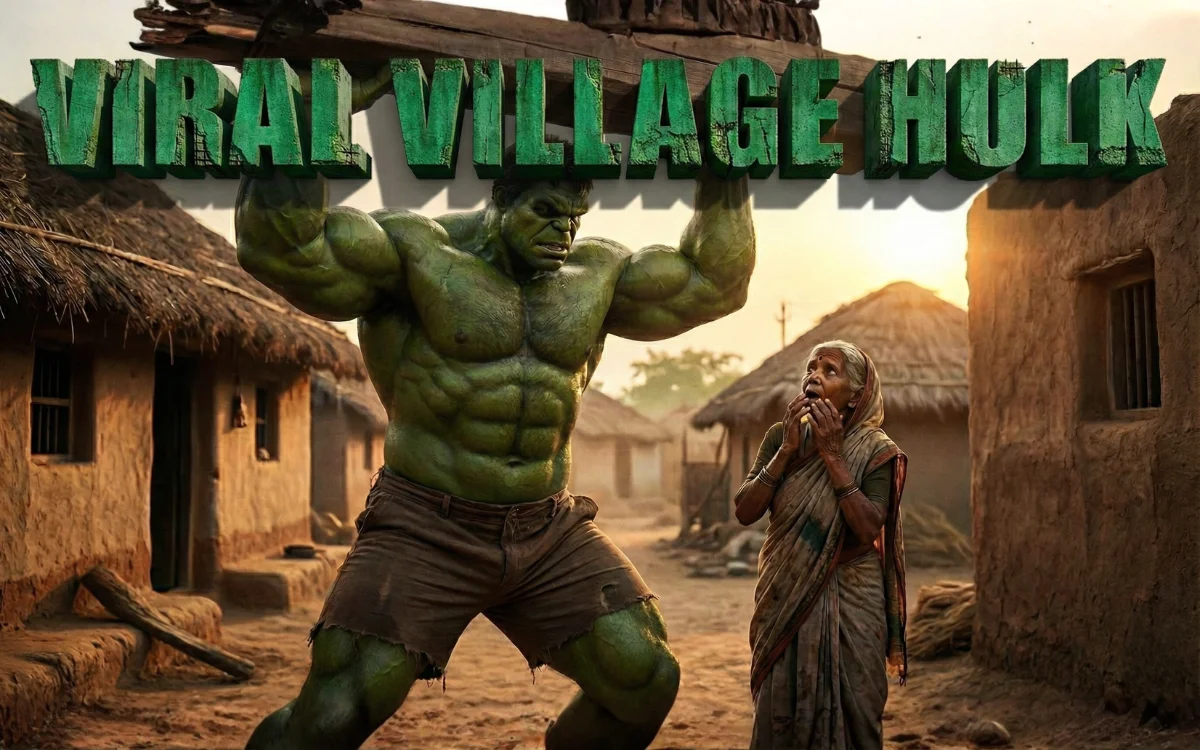
Desi Hulk AI videos—where a Hulk-inspired green character appears in an Indian village setting—are performing extremely well on Instagram Reels. These videos work because they combine familiar rural visuals with unexpected superhuman strength, creating instant curiosity and high retention.
This guide explains exactly which AI tools to use and how to use them step by step, even if you are a beginner.
Important Note Before You Start (Very Important)
You should not copy Marvel’s Hulk exactly.
For safety, originality, and AdSense approval:
- Use “Hulk-inspired”, not “Marvel Hulk”
- No Marvel logos
- No movie references
- Create an original character with green skin and muscular build
This keeps your content copyright-safe and monetization-friendly.
Step 1: Create the Base Image (Most Important Step)
The base image decides 80% of your video quality.
Best AI Tools for Image Generation
You can use any of the following:
✅ Leonardo AI (Highly Recommended)
- Best for realistic human characters
- Excellent control over lighting and realism
✅ Midjourney (Paid)
- Very cinematic
- Best if you already know prompt writing
✅ Playground AI (Free Option)
- Decent realism
- Good for testing concepts
How to Create the Image (Practical Steps)
- Open your AI image tool
- Choose photorealistic / cinematic style
- Set aspect ratio:
- 9:16 for Instagram Reels
- or 16:9 if you plan to crop later
- Use a prompt like this (example):
Ultra-realistic cinematic scene of a Hulk-inspired green muscular humanoid character standing in a rural Indian village. Massive muscles, realistic green skin texture, visible veins, wearing simple brown shorts. He is lifting a heavy wooden beam above his head. An elderly Indian village woman in a saree looks up in shock. Mud houses, thatched roofs, rural environment, warm sunlight, natural shadows. Hyper-realistic, cinematic lighting, no logos, no text, no watermark.
- Generate multiple images
- Select the most realistic and natural-looking one
Step 2: Convert the Image into a Video (AI Video Tools)
Now you animate the image. This step must be done carefully.
Best AI Video Tools Right Now
✅ Luma Dream Machine (Top Choice)
- Very realistic motion
- Best for cinematic effects
✅ Runway Gen-3
- Strong camera movement
- Good stability
✅ Pika Labs
- Easy to use
- Good for subtle animations
How to Animate the Image Correctly
- Upload your selected image
- Choose image-to-video mode
- Set video length:
- 5 to 7 seconds only
- Use a subtle animation prompt like:
Cinematic realistic motion, slight chest breathing, muscles tightening slowly, wooden beam vibrating slightly, dust particles moving, calm powerful posture, slow camera push-in, natural movement, no distortion, realistic physics
Important Rule
❌ Do NOT make the character:
- Jump
- Run
- Fight
- Move too much
Small movements feel real and professional.
Step 3: Edit the Video (Simple but Smart)
You do not need professional software.
Recommended App
- CapCut (Free)
What to Do in Editing
- Trim unnecessary frames
- Add a slight zoom-in near the end
- Increase contrast slightly
- Keep village colors warm
What to Avoid
- Heavy filters
- Text on screen
- Over-sharpening
Step 4: Add Sound (This Decides Virality)
Sound design is non-negotiable.
Best Sound Types
- Deep cinematic bass hit
- Low rumble sound
- Wooden crack or tension sound
Pro Trick (Very Important)
Add 0.3–0.5 seconds of silence before the strongest visual moment.
This increases replay and retention.
Step 5: Export Settings for Instagram
Use these settings:
- Aspect Ratio: 9:16
- Resolution: 1080 × 1920
- Frame Rate: 24–30 FPS
- Bitrate: High
Step 6: Caption Strategy (Keep It Simple)
Do NOT explain everything in the caption.
Good Caption Examples
- “What if strength lived in silence?”
- “Imagine this power in a village…”
- “Calm. Power. Presence.”
Hashtags (Max 3–5)
- #aivideo
- #desiai
- #cinematicreels
- #viralreels
Step 7: Posting Strategy
Best Time to Post
- Morning: 7–9 AM
- Evening: 6–9 PM
After Posting (First 30 Minutes)
- Reply to comments
- Share to Instagram story
- Do not edit caption
- Do not delete and repost
Instagram tests your reel first—engagement decides growth.
Common Mistakes That Kill Views
- Copying Marvel Hulk exactly
- Over-animation
- Cartoon colors
- Violent scenes
- Long videos
- Poor village background quality
Avoid these mistakes and your chances increase drastically.
Final Thoughts
Creating viral Desi Hulk AI videos is not about secret tools.
It’s about realism, cultural emotion, subtle motion, and clean execution.
If your video looks believable and calm yet powerful, people will watch it till the end—and that’s what makes it viral.