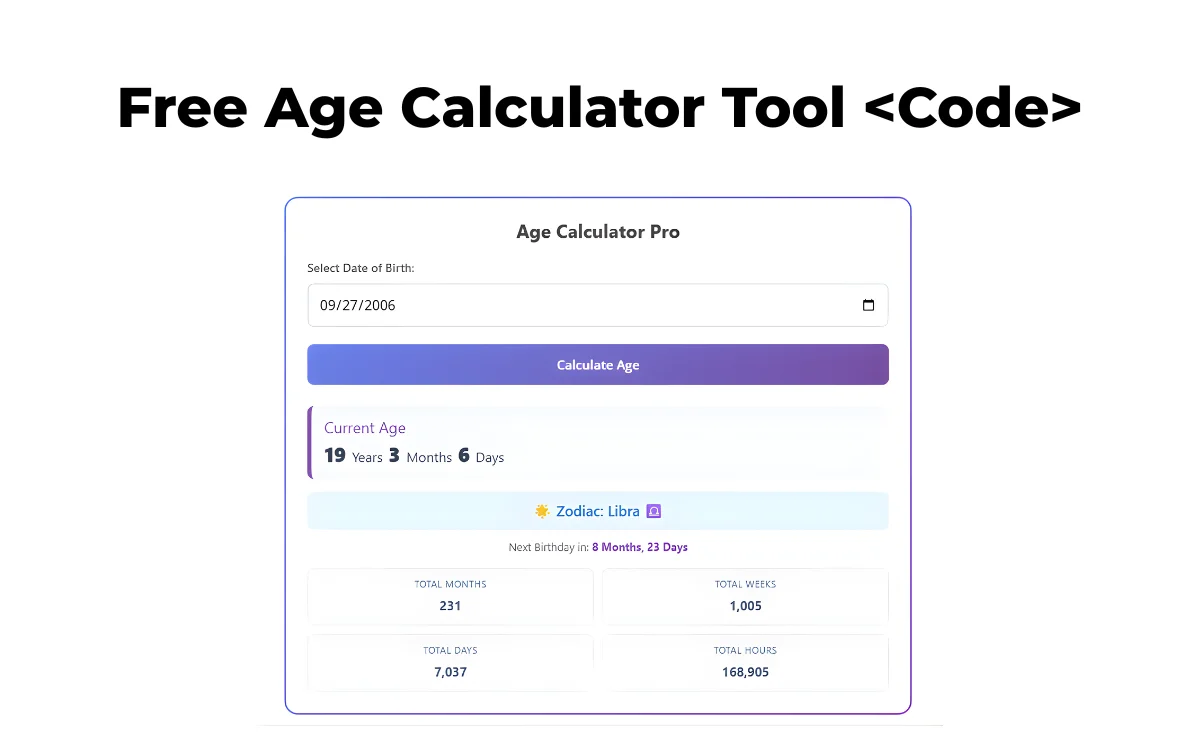
Finding your exact age in years, months, and days shouldn’t require an app or registration. That’s why this free Age Calculator tool with live preview is designed to be fast, accurate, and easy to use on any device.
This tool instantly calculates your current age, total months, weeks, days, hours, next birthday countdown, and even your zodiac sign — all without storing any personal data.
🔢 Live Age Calculator (Free Tool)
👉 Enter your date of birth below and click “Calculate Age” to see the results instantly.
Age Calculator Pro
Current Age
code:
<div id="modern-age-calculator-wrapper">
  <style>
    /* Scoped CSS to prevent conflicts with WordPress themes */
    #modern-age-calculator-wrapper {
      font-family: 'Segoe UI', Roboto, Helvetica, Arial, sans-serif;
      max-width: 100%;
      margin: 0 auto;
      background: linear-gradient(135deg, #667eea 0%, #764ba2 100%);
      padding: 2px; /* Border gradient effect */
      border-radius: 16px;
      box-shadow: 0 10px 25px -5px rgba(0, 0, 0, 0.1), 0 10px 10px -5px rgba(0, 0, 0, 0.04);
    }

    .mac-container {
      background: #ffffff;
      padding: 25px;
      border-radius: 14px;
      text-align: center;
    }

    .mac-title {
      color: #333;
      font-size: 22px;
      margin-bottom: 20px;
      font-weight: 700;
      margin-top: 0;
    }

    .mac-input-group {
      margin-bottom: 20px;
      text-align: left;
    }

    .mac-label {
      display: block;
      margin-bottom: 8px;
      font-size: 14px;
      color: #555;
      font-weight: 600;
    }

    .mac-date-input {
      width: 100%;
      padding: 12px;
      border: 2px solid #e2e8f0;
      border-radius: 8px;
      font-size: 16px;
      transition: border-color 0.3s ease;
      box-sizing: border-box;
      outline: none;
    }

    .mac-date-input:focus {
      border-color: #764ba2;
    }

    .mac-btn {
      width: 100%;
      background: linear-gradient(135deg, #667eea 0%, #764ba2 100%);
      color: white;
      border: none;
      padding: 14px;
      font-size: 16px;
      font-weight: 600;
      border-radius: 8px;
      cursor: pointer;
      transition: transform 0.2s ease, opacity 0.2s;
    }

    .mac-btn:hover {
      opacity: 0.95;
      transform: translateY(-1px);
    }

    .mac-btn:active {
      transform: translateY(1px);
    }

    /* Result Section */
    .mac-result-box {
      display: none; /* Hidden by default */
      margin-top: 25px;
      animation: fadeIn 0.5s ease-in-out;
    }

    .mac-main-age {
      background: #f7fafc;
      border-left: 5px solid #764ba2;
      padding: 15px;
      border-radius: 8px;
      margin-bottom: 15px;
      text-align: left;
    }

    .mac-main-age h3 {
      margin: 0 0 5px 0;
      color: #764ba2;
      font-size: 18px;
    }

    .mac-age-text {
      font-size: 24px;
      font-weight: 800;
      color: #2d3748;
      line-height: 1.2;
    }

    .mac-grid {
      display: grid;
      grid-template-columns: 1fr 1fr;
      gap: 10px;
      margin-top: 15px;
    }

    .mac-card {
      background: #f8f9fa;
      padding: 10px;
      border-radius: 8px;
      border: 1px solid #e2e8f0;
    }

    .mac-card-label {
      font-size: 11px;
      text-transform: uppercase;
      letter-spacing: 0.5px;
      color: #718096;
      display: block;
      margin-bottom: 4px;
    }

    .mac-card-value {
      font-size: 15px;
      font-weight: 700;
      color: #4a5568;
    }

    .mac-extra-info {
      margin-top: 15px;
      padding: 12px;
      background: #fff5f5;
      border-radius: 8px;
      color: #c53030;
      font-size: 14px;
      display: none;
    }

    .mac-zodiac {
      margin-top: 15px;
      padding: 10px;
      background: #ebf8ff;
      color: #2b6cb0;
      border-radius: 8px;
      font-weight: 600;
    }

    @keyframes fadeIn {
      from { opacity: 0; transform: translateY(10px); }
      to { opacity: 1; transform: translateY(0); }
    }
  </style>

  <div class="mac-container">
    <h2 class="mac-title">Age Calculator Pro</h2>

    <div class="mac-input-group">
      <label class="mac-label">Select Date of Birth:</label>
      <input type="date" id="mac-dob" class="mac-date-input">
    </div>

    <button onclick="calculateAge()" class="mac-btn">Calculate Age</button>

    <div id="mac-error" class="mac-extra-info">Please select a valid date in the past.</div>

    <div id="mac-result" class="mac-result-box">
      <div class="mac-main-age">
        <h3>Current Age</h3>
        <div id="mac-display-age" class="mac-age-text">0 Years</div>
      </div>

      <div class="mac-zodiac" id="mac-zodiac-display">
        </div>

      <div style="margin-top:10px; font-size: 13px; color: #666;">
        Next Birthday in: <strong id="mac-next-bday" style="color:#764ba2"></strong>
      </div>

      <div class="mac-grid">
        <div class="mac-card">
          <span class="mac-card-label">Total Months</span>
          <span class="mac-card-value" id="mac-months">0</span>
        </div>
        <div class="mac-card">
          <span class="mac-card-label">Total Weeks</span>
          <span class="mac-card-value" id="mac-weeks">0</span>
        </div>
        <div class="mac-card">
          <span class="mac-card-label">Total Days</span>
          <span class="mac-card-value" id="mac-days">0</span>
        </div>
        <div class="mac-card">
          <span class="mac-card-label">Total Hours</span>
          <span class="mac-card-value" id="mac-hours">0</span>
        </div>
      </div>
    </div>
  </div>

  <script>
    function calculateAge() {
      const dobInput = document.getElementById('mac-dob').value;
      const resultBox = document.getElementById('mac-result');
      const errorBox = document.getElementById('mac-error');

      // Validation
      if (!dobInput) {
        errorBox.style.display = 'block';
        resultBox.style.display = 'none';
        errorBox.innerText = "Please select your date of birth.";
        return;
      }

      const dob = new Date(dobInput);
      const today = new Date();

      if (dob > today) {
        errorBox.style.display = 'block';
        resultBox.style.display = 'none';
        errorBox.innerText = "Date cannot be in the future!";
        return;
      }

      errorBox.style.display = 'none';

      // 1. Calculate Standard Age (Years, Months, Days)
      let years = today.getFullYear() - dob.getFullYear();
      let months = today.getMonth() - dob.getMonth();
      let days = today.getDate() - dob.getDate();

      if (days < 0) {
        months--;
        days += new Date(today.getFullYear(), today.getMonth(), 0).getDate();
      }
      if (months < 0) {
        years--;
        months += 12;
      }

      // Display Main Age
      document.getElementById('mac-display-age').innerHTML =
        `${years} <span style="font-size:16px; font-weight:400">Years</span> ${months} <span style="font-size:16px; font-weight:400">Months</span> ${days} <span style="font-size:16px; font-weight:400">Days</span>`;

      // 2. Calculate Total Stats
      const diffTime = Math.abs(today - dob);
      const totalDays = Math.floor(diffTime / (1000 * 60 * 60 * 24));
      const totalWeeks = Math.floor(totalDays / 7);
      const totalMonths = (years * 12) + months;
      const totalHours = Math.floor(diffTime / (1000 * 60 * 60));

      document.getElementById('mac-months').innerText = totalMonths.toLocaleString();
      document.getElementById('mac-weeks').innerText = totalWeeks.toLocaleString();
      document.getElementById('mac-days').innerText = totalDays.toLocaleString();
      document.getElementById('mac-hours').innerText = totalHours.toLocaleString();

      // 3. Next Birthday Countdown
      const currentYear = today.getFullYear();
      let nextBirthday = new Date(dob);
      nextBirthday.setFullYear(currentYear);

      if (nextBirthday < today) {
        nextBirthday.setFullYear(currentYear + 1);
      }

      const diffNextBday = nextBirthday - today;
      const daysToBday = Math.floor(diffNextBday / (1000 * 60 * 60 * 24));
      const monthsToBday = Math.floor(daysToBday / 30.44); // Approx
      const remainingDays = Math.floor(daysToBday % 30.44);

      let nextBdayString = "";
      if(daysToBday === 0) {
        nextBdayString = "Today! Happy Birthday! 🎂";
      } else {
        nextBdayString = `${monthsToBday} Months, ${remainingDays} Days`;
      }
      document.getElementById('mac-next-bday').innerText = nextBdayString;

      // 4. Get Zodiac Sign
      const zodiac = getZodiacSign(dob.getDate(), dob.getMonth() + 1);
      document.getElementById('mac-zodiac-display').innerHTML = `🌟 Zodiac: ${zodiac}`;

      // Show Results
      resultBox.style.display = 'block';
    }

    function getZodiacSign(day, month) {
      if ((month == 1 && day <= 20) || (month == 12 && day >= 22)) return "Capricorn ♑";
      if ((month == 1 && day >= 21) || (month == 2 && day <= 18)) return "Aquarius ♒";
      if ((month == 2 && day >= 19) || (month == 3 && day <= 20)) return "Pisces ♓";
      if ((month == 3 && day >= 21) || (month == 4 && day <= 19)) return "Aries ♈";
      if ((month == 4 && day >= 20) || (month == 5 && day <= 20)) return "Taurus ♉";
      if ((month == 5 && day >= 21) || (month == 6 && day <= 20)) return "Gemini ♊";
      if ((month == 6 && day >= 21) || (month == 7 && day <= 22)) return "Cancer ♋";
      if ((month == 7 && day >= 23) || (month == 8 && day <= 22)) return "Leo ♌";
      if ((month == 8 && day >= 23) || (month == 9 && day <= 22)) return "Virgo ♍";
      if ((month == 9 && day >= 23) || (month == 10 && day <= 22)) return "Libra ♎";
      if ((month == 10 && day >= 23) || (month == 11 && day <= 21)) return "Scorpio ♏";
      if ((month == 11 && day >= 22) || (month == 12 && day <= 21)) return "Sagittarius ♐";
      return "Unknown";
    }
  </script>
</div>
🚀 What This Age Calculator Tool Can Do
Unlike basic age calculators, this tool gives complete age insights in one place:
- ✅ Exact age (Years, Months, Days)
- ✅ Total age in months, weeks, days, and hours
- ✅ Countdown to your next birthday
- ✅ Zodiac sign based on date of birth
- ✅ Clean, modern design with live preview
- ✅ Mobile-friendly and fast loading
No login. No signup. No ads inside the tool.
🎯 Why Use This Free Age Calculator?
Most online age calculators only show your age in years. This one goes further and answers questions people actually ask, such as:
- How many days old am I?
- How long until my next birthday?
- What is my zodiac sign?
- What is my age in weeks or hours?
This makes the tool useful for:
- Students
- Parents
- Job and exam forms
- Astrology curiosity
- Everyday personal use
🧠 How the Age Calculation Works
The calculator uses your date of birth and today’s date to calculate:
- Calendar-accurate years, months, and days
- Total time lived using real time difference
- Next birthday based on the current year
- Zodiac sign using standard astrology ranges
All calculations happen inside your browser, so your data stays private.
📱 Fully Responsive & SEO-Friendly
This age calculator tool is:
- Optimized for mobile, tablet, and desktop
- Styled to avoid conflicts with WordPress themes
- Lightweight and fast (no external libraries)
- Perfect for tool pages and AdSense approval
If you’re running a tools website, this fits perfectly with Google’s “helpful content” guidelines.
🧩 How to Add This Age Calculator to WordPress
Follow these steps carefully:
- Open WordPress Dashboard
- Go to Pages → Add New (or Edit existing page)
- Switch to Custom HTML block
- Paste the full tool code
- Publish or update the page
💡 Tip:
Use a title like “Free Online Age Calculator Tool” and keep this page clean without too many ads.
🔐 Is This Tool Safe to Use?
Yes.
This age calculator:
- Does NOT collect data
- Does NOT store birthdays
- Runs completely on the client side
- Works offline after page load
Safe for users and safe for AdSense.
❓ Frequently Asked Questions
Is this age calculator free?
Yes, it is 100% free with no usage limits.
Does it work on mobile?
Yes, the tool is fully responsive and mobile-friendly.
Can I use this tool on my website?
Yes, you can use it on your own website or tools section.
Does it calculate zodiac signs correctly?
Yes, zodiac signs are calculated using standard date ranges.
⭐ Final Words
If you’re looking for a modern, accurate, and user-friendly age calculator tool with live preview, this is a perfect solution. It improves user engagement, increases time on page, and adds real value — exactly what Google and AdSense look for.
If you want:
- A download button
- Dark mode
- Share age result
- More tool pages like this
Just tell me — I’ll build it properly, not lazily.