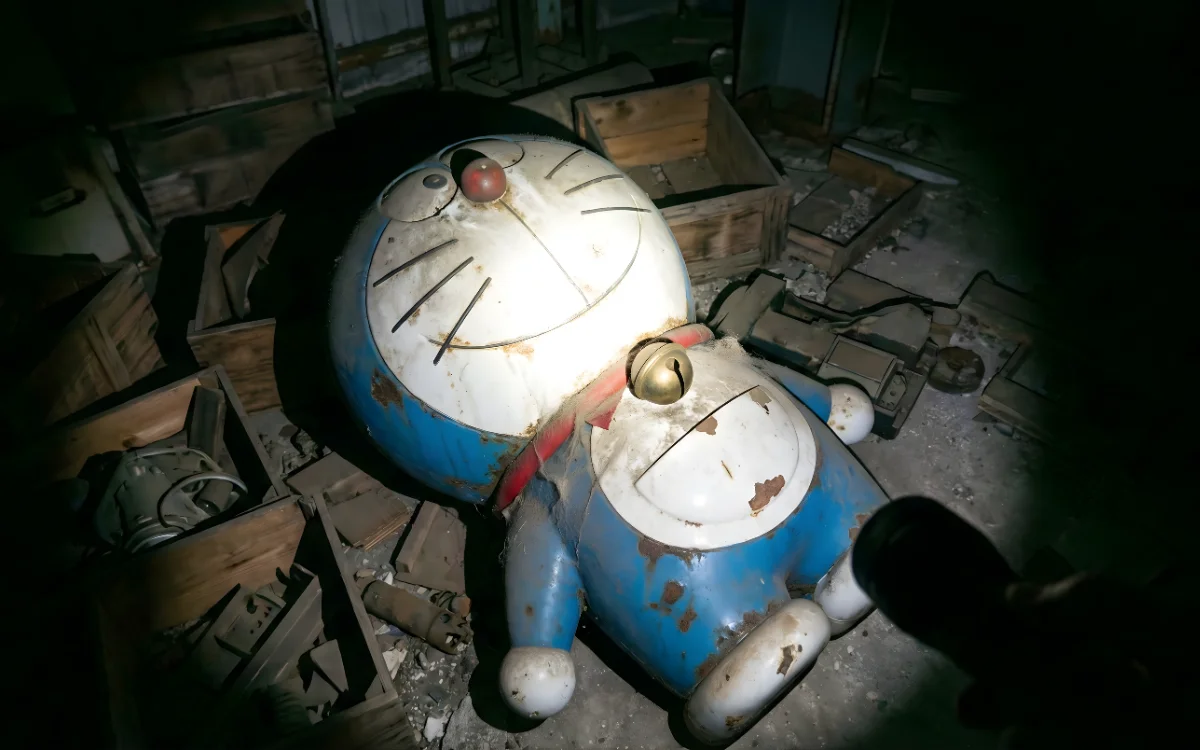
First-person POV flashlight videos are becoming viral because they feel real, immersive, and emotionally unsettling. Viewers don’t feel like they are watching a video — they feel like they are inside it.
This article explains exactly how to create such AI videos using image and video generation tools, how to refine your prompt for better realism, and how to prepare the final video for Instagram or Shorts.
Why This POV Flashlight Format Works
This style works because it combines:
- First-person immersion
- Darkness and mystery
- Realistic lighting physics
- Human camera movement
- Emotional curiosity
The brain treats it like a memory or real experience, not animation.
That is why retention stays high.
Step 1: Generate the Base Image
Your provided image prompt is strong. But it needs slight refinement for better realism and AI understanding.
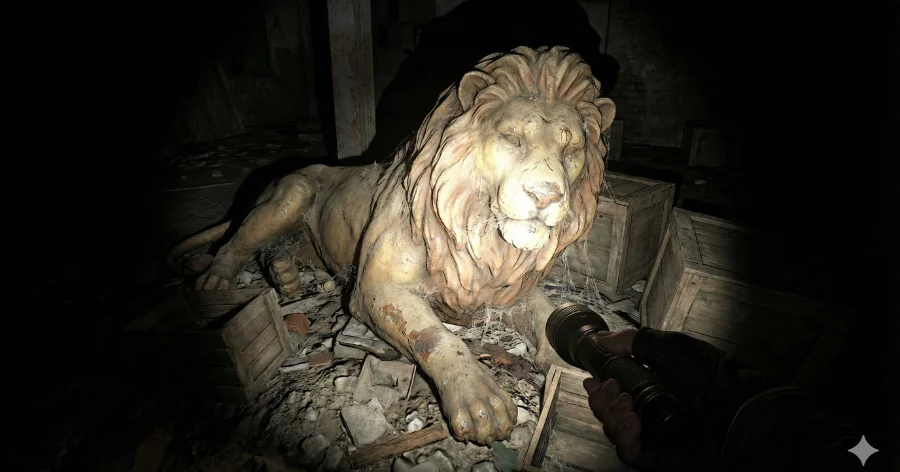
Your Original Idea (Improved Rewrite)
🔹 Image Prompt – Optimized Version
First-person POV scene at night. The viewer is holding a realistic flashlight. The flashlight beam reveals a hyper-realistic, physically accurate [object] lying unconscious in a dark abandoned indoor space.
The environment shows real-world scale and believable proportions. Materials look real with natural wear, dust buildup, chipped surfaces, fabric fibers, subtle scratches and imperfections.
Lighting is realistic: strong flashlight hotspot with smooth falloff, deep shadows, ambient darkness surrounding the subject.
No stylization, no cartoon, no animation look, no toy or plush texture.
Cinematic realism, grounded scale, ultra-detailed textures, subtle film grain, eerie nostalgic atmosphere.
Aspect ratio 9:16, high resolution, realistic photography style.
👉 Replace [object] with what you want:
- human body
- statue
- animal
- robot
- doll
- creature
- abandoned machine
Best AI Tools for Image Generation
Use any of these:
- Leonardo AI (best realism)
- Nano Banana
- Midjourney
- Playground AI
Settings Tips
- Style: Photorealistic / Cinematic
- Guidance: Medium
- Avoid anime or illustration presets
Generate multiple images and select the most realistic one.
Step 2: Convert Image to Video
Now convert that image into a short cinematic video.
Best AI Video Tools
- Luma Dream Machine (Best)
- Veo 3.1
- Runway Gen-3
- Pika Labs
Step 3: Your Video Prompt (Rewritten for Better Motion)
Your original idea is good but needs realism tuning.
🔹 Video Animation Prompt – Optimized Version
First-person POV video at night. Handheld shaky realism. Slow natural movement. Flashlight beam moves slowly side to side, scanning only the [object], which remains frozen in time.
Subtle camera breathing motion, natural hand tremble, realistic light movement, soft dust particles visible in air, deep shadows shifting naturally.
No distortion, no animation artifacts, realistic physics, cinematic realism.
Step 4: Key Animation Rules
❌ Do NOT animate the object
✅ Only animate:
- flashlight movement
- camera motion
- dust particles
- light flicker
Stillness creates fear and realism.
Step 5: Video Length
Best viral length:
- 5 to 7 seconds
- Vertical 9:16
- 24–30 FPS
Longer videos lose impact.
Step 6: Sound Design (Critical for Virality)
Use:
- Soft flashlight hum
- Light breathing sound
- Distant ambient echo
- 0.3 second silence before beam hits object
Sound should be felt, not noticed.
Step 7: Editing in CapCut
Do only:
- Slight contrast boost
- Light film grain
- Tiny zoom-in at the end
Do NOT add:
- Text
- Emojis
- Filters
- Music beats
Let atmosphere control the emotion.
Step 8: Caption Strategy
Keep it minimal.
Examples:
- “You weren’t supposed to find this.”
- “Some things should stay in the dark.”
- “Would you keep watching?”
Step 9: Hashtags
Use only 3–5:
#aivideo
#cinematicai
#povvideo
#viralreels
Common Mistakes
- Object moving too much
- Cartoon textures
- Bright lighting
- Too much motion
- Long duration
- Fake physics
These destroy realism instantly.
Why This Prompt Style Is Powerful
This format works because:
- POV creates emotional ownership
- Flashlight creates focus control
- Still object creates tension
- Darkness boosts curiosity
This combination triggers replay behavior.
Final Thoughts
Your prompt style is already very strong. With proper refinement and execution, this format has huge viral potential across:
- Instagram Reels
- YouTube Shorts
- TikTok
- Pinterest videos
The key is realism, stillness, and subtle motion.
Bonus: Ultra-Short Prompt Version (For Quick Testing)
Image Prompt Short Version
First-person POV flashlight at night revealing a hyper-realistic [object] in a dark abandoned space, realistic textures, cinematic lighting, natural imperfections, no stylization, 9:16.
Video Prompt Short Version
Handheld POV, flashlight scanning frozen [object], subtle camera shake, realistic light movement, cinematic realism.